This article contains affiliate links. We may earn a commission from qualifying purchases.
Some content on this site is AI-assisted and reviewed by our editorial team.
Most “10 Alexa Routines” lists include things like “Alexa, good morning” that tells you the weather and reads your calendar. That’s fine, but it saves you maybe 30 seconds. We’ve been using Alexa routines for two years and have found 10 that genuinely save time — the kind where you look up and realize you just skipped 5 minutes of manual tasks.
1. “Leaving for Work” — Lock Up and Shut Down
Trigger: “Alexa, leaving for work”
Actions: Turn off all lights, lock the front door, arm the security system, turn off the coffee maker, set thermostat to away mode.
Time saved: 2-3 minutes of walking around checking everything
The key here is combining multiple checks into one command. Instead of walking through every room, you say one thing and walk out the door. Add a 30-second delay on the lights so you’re not standing in the dark waiting for the door to lock.
2. “Bedtime” — Secure and Settle
Trigger: “Alexa, bedtime”
Actions: Lock all doors, turn off all lights except the bedroom lamp (set to 10%), set thermostat to sleeping temp, turn on white noise, start a 30-minute sleep timer on the bedroom speaker.
Time saved: 2-3 minutes
This one is about the ritual. Instead of checking doors, adjusting thermostats, and fumbling for the bedside lamp, one command handles it all. The dimmed bedroom light gives you time to get into bed before it goes off with the sleep timer.
3. “Movie Time” — Entertainment Mode
Trigger: “Alexa, movie time”
Actions: Dim living room lights to 15%, close smart blinds (if you have them), turn on the TV and set to HDMI 1, set volume to 35%.
Time saved: 1-2 minutes
This isn’t just about saving time — it’s about the experience. The lights dim, the TV fires up, and you feel like you’re in an actual theater. Worth the 5 minutes it takes to set up the routine.
4. “Cooking Time” — Kitchen Assistant
Trigger: “Alexa, cooking time”
Actions: Turn on kitchen lights to 100%, set a 30-minute timer, start playing a cooking playlist on Spotify, turn on the kitchen fan.
Time saved: 1 minute
More of a workflow optimization than a time-saver, but having the timer start automatically and music kick in makes cooking feel less like a chore. Change the timer length based on what you typically cook.
5. “Good Morning” — Actually Useful Version
Trigger: “Alexa, good morning” (or scheduled for your wake time)
Actions: Gradually turn on bedroom lights to 30%, start coffee maker (smart plug), set thermostat to morning temp, read today’s weather and commute time, play news briefing.
Time saved: 3-4 minutes
The coffee maker on a smart plug is the real MVP here. Waking up to coffee that’s already brewing is a small luxury that makes mornings noticeably better. If your coffee maker doesn’t have a physical switch that remembers its state, just leave it on and let the smart plug control power.
6. “Workout Start” — Exercise Mode
Trigger: “Alexa, workout time”
Actions: Turn on garage/basement lights, set thermostat to 68°F, start a workout playlist at volume 4, start a 45-minute timer, announce “Let’s go” through the speaker.
Time saved: 1 minute, but the real value is removing friction from starting a workout
7. “Laundry Reminder” — Never Forget a Load
Trigger: “Alexa, laundry in”
Actions: Set a 60-minute timer (or your washer’s cycle time), announce “Move the laundry to the dryer” when the timer goes off, set a second 60-minute timer for the dryer.
Time saved: However much time you spend re-washing musty loads you forgot about
This routine pays for itself by preventing the “I left laundry in the washer for two days and now it smells” problem. Adjust the timer length for your specific machines.
8. “Kids Home from School” — Notification Mode


Trigger: Scheduled for 3:15 PM (or triggered by a door sensor)
Actions: Send a notification to your phone (“Kids are home”), turn on entryway lights, set thermostat to home temp.
Time saved: Peace of mind is the real value here
If you have a smart lock, add an action to unlock the door at 3:10 and re-lock at 3:30. If you have a door sensor, use that as the trigger instead of a schedule.
9. “Dinner Party” — Hosting Mode
Trigger: “Alexa, dinner party”
Actions: Set living room lights to 40% warm white, kitchen lights to 80%, play dinner playlist at volume 3, set thermostat to 70°F, turn on patio lights.
Time saved: 2 minutes of running around adjusting things while guests arrive
You’ll customize this one heavily based on your home layout, but the concept is one command that sets the entire house to “hosting” mode.
10. “Find My Phone” — The Emergency Routine
Trigger: “Alexa, find my phone”
Actions: Call your phone (via the “Alexa, call my phone” skill), turn on all lights in the house to 100% (so you can see while looking).
Time saved: 5-10 minutes of tearing apart couch cushions
This sounds silly until you’ve used it three times and realized it saves you genuine frustration every time. Pair it with IFTTT to also ring your phone at maximum volume, even if it’s on silent.
Setting These Up
All of these routines are built in the Alexa app under “Routines.” Most take 5-10 minutes to set up. The initial time investment pays back within a week for most of them.
Start with “Leaving for Work” and “Bedtime” — those two alone cover the most common time-wasting scenarios. Add more as you figure out what would help your specific day.
Devices Mentioned in This Post
We may earn a commission if you purchase through these links. Product prices were accurate at the time of publishing.
- Echo Pop | Compare prices (affiliate links)
- Echo Dot (5th Gen) | Compare prices (affiliate links)
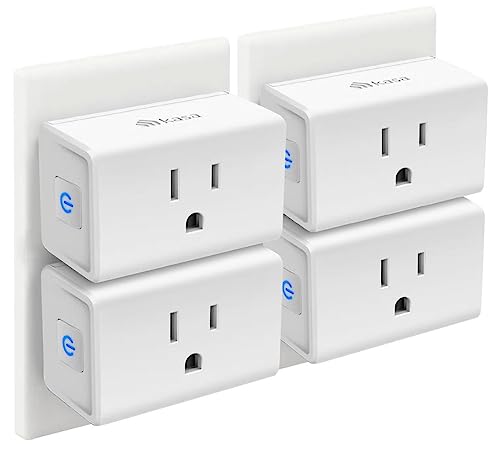
- Kasa Smart Plug Mini | Compare prices (affiliate links)
- Philips Hue Smart Bulbs | Compare prices (affiliate links)
- Ring Indoor Cam | Compare prices (affiliate links)
- Wyze Cam v4 | Compare prices (affiliate links)
- August Smart Lock | Compare prices (affiliate links)
- Google Nest Thermostat | Compare prices (affiliate links)
n

The Bottom Line
These 10 routines take maybe 20 minutes total to set up, and they save you 15 to 20 minutes every single day. Start with the ones that solve your biggest daily friction points — for most people, that is the leaving-for-work and bedtime routines. Once you have those working, add the rest one at a time. The beauty of Alexa routines is that you can tweak them as your habits change. Your smart home should adapt to your life, not the other way around.
My take: Start with two routines — “Leaving for Work” and “Bedtime” — and you’ve automated the two moments of the day where checking everything manually wastes the most time. The rest are gravy; add them as you feel the friction instead of building all ten at once.
Related guides
- Smart Home Smart Speaker Showdown (2026): Echo vs Nest vs HomePod — Which One Sounds Best and Works Best?
- 4 Outdoor Security Cameras Under 100 Dollars Worth Buying
- Ring vs Wyze Cameras (2026): Which Should You Buy?
- Video Doorbells Compared on 4-Year Cost: Ring, Wyze, Aqara, and Eufy Without the Subscription Trap
- Ring Alarm vs SimpliSafe: The First-Year Math on the Two Default DIY Kits
🏠 Get Your Free Smart Home Setup Checklist
Join our newsletter and get this free printable plus weekly tips.
Frequently Asked Questions
How do I create an Alexa routine?
Open the Alexa app, go to Routines, tap the plus icon, choose a trigger (voice command, schedule, or smart home device), then add actions like turning off lights, locking doors, or setting timers. Most routines take 5-10 minutes to set up.
What are the most useful Alexa routines?
The most useful Alexa routines are Leaving for Work (locks doors, turns off lights, arms security), Bedtime (locks doors, dims lights, sets thermostat), and Good Morning (starts coffee, reads weather, turns on lights). These three save 7-10 minutes daily.
Can Alexa routines control smart locks?
Yes, Alexa routines can control smart locks like the August Smart Lock. You can add lock and unlock actions to any routine. For security, pair lock actions with door sensor triggers rather than schedules, and always set up a re-lock delay for routines like Kids Home from School.
Do Alexa routines work without internet?
No, Alexa routines require internet to process voice commands and communicate with smart home devices. However, some smart home devices with hub-based connections like Zigbee devices paired to an Echo with a built-in hub may work locally during outages.
Liked this guide? Get the next one in your inbox — the smart home starter checklist is free too.
✓ You're in — check your inbox.
No spam. Unsubscribe anytime. We never share your email.
Price Check
Prices verified via our product tracker. Updated Oct 31.
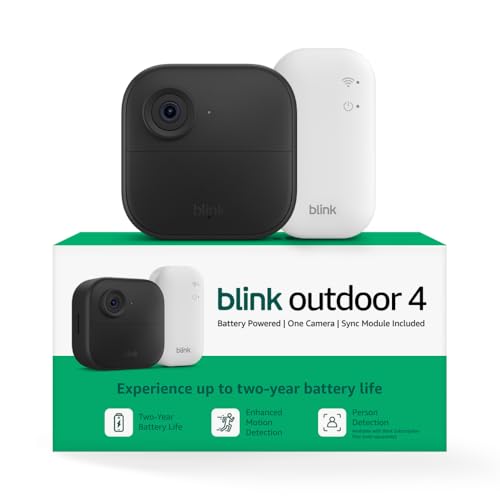
| Blink Outdoor 4 Wireless Smart Security Camera, 1 camera s | $27.99 | 4.1★ (35,239) |
| Amazon Echo Dot (newest model) - Vibrant sounding speaker | $79.99 | 4.7★ (200,849) |
| Kasa Smart Plug Ultra Mini 15A, EP10P4, Smart Home Wi-Fi O | $22.99 | 4.5★ (40,660) |
| Philips Hue Smart Light Starter Kit - Includes (1) Bridge | $139.81 | 4.5★ (832) |
| Ring Indoor Cam | Indoor Home Security Camera System | Ama | $84.98 | 4.7★ (46,054) |
| WYZE Cam v4 (Latest Model), 2.5K AI Security Camera, Indoo | $44.97 | 4.3★ (11,330) |
| Google Nest Thermostat - Smart Thermostat for Home - Progr | $129.99 | 4.1★ (29,634) |
As an Amazon Associate we earn from qualifying purchases.