
This article contains affiliate links. We may earn a commission from qualifying purchases.
Some content on this site is AI-assisted and reviewed by our editorial team.
Smart Home Energy Audit: How to Find What Is Draining Power in 30 Minutes
Your electricity bill went up 40 dollars last month and you cannot figure out why. Nothing changed. Same thermostat settings, same lights, same TV. But something is using more power and you are paying for it. A smart home energy audit takes 30 minutes and can identify exactly which devices are costing you money.

You do not need to be an electrician. You do not need to buy expensive monitoring equipment. If you have a few smart plugs and your phone, you already have everything required. Here is how to audit your home energy usage step by step.

Step 1: Check Your Smart Thermostat Data
If you have an Ecobee, open the app and look at your runtime data for the past 30 days. Both platforms show how many hours per day your HVAC system ran. Compare this month to last month.
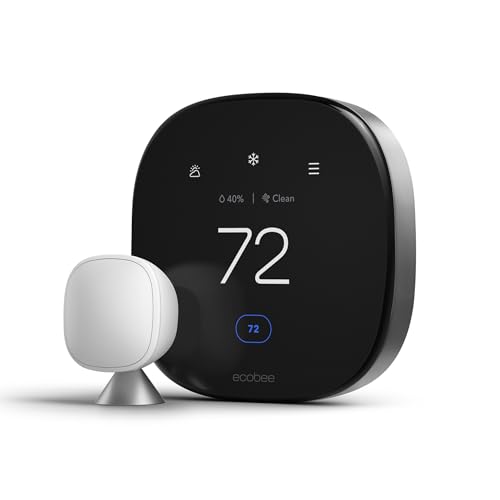
If your HVAC runtime increased by 2 hours per day, that explains the bill spike. Common causes: a dirty air filter forcing the system to work harder, a refrigerant leak, or seasonal temperature changes. Replace your air filter first. It costs 15 dollars and fixes 80 percent of HVAC efficiency problems.
Also check your thermostat’s heat stage settings. If it is set to “auxiliary heat” on a heat pump system, that uses resistance heating which is 3x more expensive than normal heat pump operation. Disable automatic auxiliary heat and set it to lock out above 35 degrees Fahrenheit.
Step 2: Audit Always-On Devices with Smart Plugs
Devices that stay plugged in 24/7 draw power even when off. This is called phantom power or vampire draw. The biggest offenders are usually: TV and entertainment systems, desktop computers and monitors, coffee makers with digital displays, and phone chargers left plugged in.
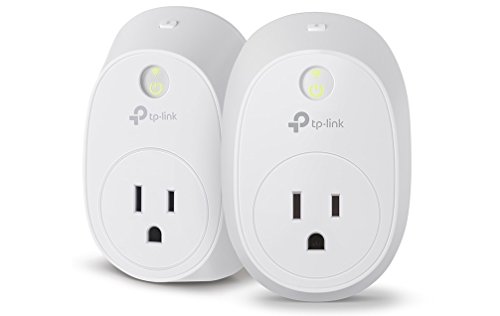
Plug each device into a smart plug with energy monitoring for 24 hours. The smart plug app will show you exactly how many watt-hours the device consumed. Anything drawing more than 5 watts when “off” is a candidate for automation.
Here is what to check first:
- TV and soundbar: Can draw 15 to 30 watts in standby. Put on a smart plug that turns off when you leave the house.
- Desktop computer: If it sleeps properly, it draws 2 to 5 watts. If sleep is disabled, it draws 60 to 150 watts continuously. Fix sleep settings first.
- Cable box or DVR: The worst offender. Draws 25 to 45 watts constantly, even when off. Some providers do not allow smart plug cutoff because it disrupts recordings. Check yours.
- Game console: PlayStation and Xbox draw 10 to 20 watts in rest mode. Enable energy-saving mode or put on a smart plug.

Step 3: Check Water Heater Usage
Your water heater is typically the second biggest energy user after HVAC. If you have a smart water heater or a smart plug on a tank heater, check how many hours per day it runs.
A standard 50-gallon tank heater uses 4,500 watts when heating. If it runs 3 hours per day, that is 13.5 kWh per day or about 40 dollars per month at 10 cents per kWh. If it runs 5 hours per day, you are paying 67 dollars per month just for hot water.
Ways to reduce water heater energy:
- Lower the thermostat from 140 to 120 degrees. You will not notice the difference in the shower, but you save 10 percent per month.
- Install a smart water heater controller that schedules heating for off-peak hours if your utility offers time-of-use rates.
- Insulate the tank and the first 6 feet of hot water pipe. A 20 dollar insulation kit saves 7 to 10 percent.
- Check for leaks. A dripping hot water faucet wastes 200 to 400 gallons of heated water per month.
Step 4: Measure Refrigerator Efficiency
Your refrigerator runs 24/7 and is the third biggest energy consumer in most homes. A modern refrigerator uses 1 to 2 kWh per day. An older model (pre-2010) can use 3 to 5 kWh per day.
To measure: plug the refrigerator into a smart plug with energy monitoring for 48 hours. If it is using more than 2.5 kWh per day:
- Clean the condenser coils (usually behind or under the fridge). Dust buildup forces the compressor to run longer.
- Check the door seals by closing a dollar bill in the door. If it slides out easily, the seal is failing and needs replacement.
- Check the temperature setting. The FDA recommends 38 to 40 degrees for the fridge and 0 degrees for the freezer. Setting it colder wastes energy.
- Consider replacing if your refrigerator is more than 12 years old. A new Energy Star model uses 60 percent less energy.

Step 5: Audit Lighting Usage
Lighting accounts for 10 to 15 percent of your electricity bill. Smart bulbs make it easy to see exactly how much each light uses. Open your smart bulb app and check usage data for the past 30 days.
If you still have incandescent bulbs, replace them with LED or smart LED bulbs. A 60-watt incandescent uses 60 watts. An equivalent LED uses 9 watts. At 4 hours per day, that saves 18 kWh per year per bulb. With 20 bulbs in a typical home, you save 360 kWh per year or about 36 dollars annually.
Philips Hue White Ambiance bulbs let you automate dimming schedules so lights automatically reduce to 60 percent brightness after 9 PM. This extends bulb life and saves another 5 to 8 percent on lighting costs.
Step 6: Check Pool Pumps and Irrigation
If you have a pool, the pump is likely your biggest single energy user after HVAC. A standard pool pump uses 1,500 to 2,000 watts and runs 8 to 12 hours per day. That is 12 to 24 kWh per day, or 36 to 72 dollars per month.
A variable-speed pool pump uses 300 to 800 watts and can be programmed to run at lower speeds for longer periods. The savings are significant: 60 to 80 percent reduction in pool pump energy costs. A smart pool pump controller lets you schedule and monitor usage from your phone.
For irrigation, a smart sprinkler controller like Rachio or Orbit B-hyve adjusts watering based on weather data. In summer, this saves 30 to 50 percent on water bills. The controller also tracks water usage so you can see exactly how much each zone uses.

Step 7: Use Whole-Home Energy Monitoring
If you want a complete picture of your home’s energy usage, install a whole-home energy monitor. The Sense Energy Monitor installs in your electrical panel and uses machine learning to identify individual devices by their electrical signatures. After 2 to 4 weeks of learning, it can tell you exactly how much your fridge, TV, dryer, and EV charger each use.
The Emporia Vue is a cheaper alternative at about 100 dollars. It provides real-time whole-home monitoring and individual circuit tracking if you install the circuit-level sensors. Both systems connect to your Wi-Fi and send data to a phone app.
Whole-home monitors are the most effective tool for catching energy waste because they see everything, not just devices on smart plugs. They can identify a failing appliance compressor, a stuck thermostat on a baseboard heater, or a well pump running continuously due to a leak.
Step 8: Create an Energy-Saving Automation
Once you know which devices waste energy, set up automations to fix it:
- Away mode: When everyone leaves the house (geofence trigger), turn off all entertainment devices via smart plugs, lower thermostat by 3 degrees, turn off non-essential lights.
- Peak hour reduction: If your utility charges more during peak hours (usually 3 to 7 PM), schedule your dishwasher, laundry, and EV charging for 10 PM or later.
- Standby killer: Put all entertainment devices on one smart power strip that turns off completely when you are not actively watching TV.
- Seasonal adjustment: Create a monthly reminder to review thermostat runtime data and adjust settings based on seasonal changes.
The Bottom Line
A 30-minute smart home energy audit can save you 20 to 40 dollars per month. The biggest wins are usually the simplest: replace air filters, lower water heater temperature, clean refrigerator coils, and put entertainment devices on smart plugs that cut power when not in use. You do not need expensive monitoring equipment to find the waste. A few smart plugs and your thermostat’s built-in data are enough to identify 80 percent of energy problems.
The key is to actually look at the data your smart devices are already collecting. Your thermostat knows how long your HVAC runs. Your smart plugs know how much each device draws. Your smart bulb app knows your lighting patterns. Spend 30 minutes reviewing it, and the savings will pay for the time you spent.
Related Reading
- Smart Home for Night Shift Workers: Automations That Protect Sleep
- Smart Home Energy Savings During Heat Waves
Get Our Free Smart Home Setup Checklist
Join 2,000+ smart home owners getting weekly tips and gear picks. No spam, unsubscribe anytime.
My take: A 30-minute audit with the plugs and app you already own usually finds the culprit in the first two places you look: the HVAC runtime graph (change the filter first) and the entertainment center’s standby draw. Don’t guess at the bill — the data is sitting in your thermostat app right now.
Related guides
- Ceiling Fans That Run Themselves: The Winter-Reverse Setting Everyone Skips
- Smart Home Coffee Maker Automation: How to Wake Up to Fresh Coffee Without Lifting a Finger
- Why Smart Blinds Are the Most Underrated Smart Home Upgrade
- Smart Home Setup for Small Spaces: Studio and Apartment Automation That Fits
- How to Smart-Home Your Garage (Without Spending a Fortune on Features You Don't Need)
🏠 Get Your Free Smart Home Setup Checklist
Join our newsletter and get this free printable plus weekly tips.
Frequently Asked Questions
How do I find what’s raising my electric bill?
Start with the thermostat data: open your Ecobee or Nest app and compare 30-day HVAC runtime month to month — a 2-hour-per-day increase explains most spikes, and the usual culprit is a dirty air filter ($15, fixes 80% of HVAC efficiency problems) or auxiliary heat running on a heat pump (3x the cost of normal operation; lock it out above 35°F). Then move to always-on devices with energy-monitoring smart plugs.
How do I audit phantom power?
Plug each suspect device into an energy-monitoring smart plug for 24 hours and read the watt-hours in the app — anything drawing more than 5 watts while “off” is an automation candidate. The usual offenders: TVs and soundbars (15–30 W standby), cable boxes and DVRs (they record and update around the clock), desktop computers that never truly sleep, coffee makers with digital displays, and the phone chargers left in every outlet.
What’s the fastest energy fix once I find the waste?
Schedules and cutoffs: put the entertainment center on a smart plug that kills it when you leave, set the home office gear to hibernate (zero power, unlike sleep mode), and time-shift big loads like the water heater to off-peak rates. The audit takes 30 minutes with plugs you may already own — the savings show up on the next bill.
Liked this guide? Get the next one in your inbox — the smart home starter checklist is free too.
✓ You're in — check your inbox.
No spam. Unsubscribe anytime. We never share your email.
Price Check
Prices verified via our product tracker. Updated Sep 27.
| ecobee Smart Thermostat Premium - WiFi, Siri & Alexa Built | $252.99 | 4.3★ (4,170) |
| Eve Energy (Matter) - Smart Plug, App and Voice Control, 1 | $43.95 | 4.2★ (432) |
| Kasa Smart WiFi Plug w/ Energy Monitoring by TP-Link – No | $134.98 | 4.3★ (291) |
| Philips Hue White Ambiance A19 2-Pack 60W Equivalent Dimma | $26.99 | 4.6★ (793) |
| REOLINK 4K 8MP Dual-Lens PTZ Wired WiFi Outdoor Security C | $219.99 | 4.2★ (1,518) |
| UNIFI Protect G4-PRO Camera : Electronics | $360.00 | 4.6★ (344) |
As an Amazon Associate we earn from qualifying purchases.