
This article contains affiliate links. We may earn a commission from qualifying purchases.
Some content on this site is AI-assisted and reviewed by our editorial team.
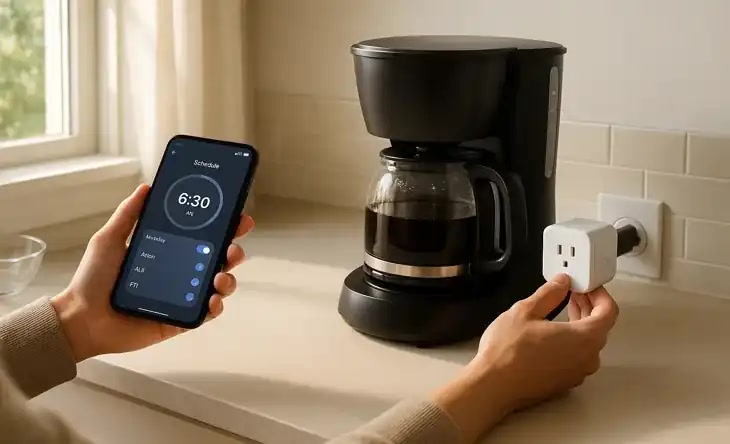
The smart home promise that actually delivers: waking up to the smell of fresh coffee. Not a gimmick. Not a parlor trick. Just hot coffee ready when you walk into the kitchen. It costs under 25 dollars and takes 10 minutes to set up.

The trick is that you don’t need a “smart coffee maker” (which are overpriced and usually bad). You just need a regular coffee maker and a smart plug. Here’s how to make it work.
The Basic Setup (Under 25 Dollars)
You need two things: a coffee maker with a physical power switch that stays in the “on” position, and a smart plug.
Which Coffee Makers Work
The critical requirement: the coffee maker must start brewing when it receives power. If your coffee maker has a button you press to start brewing, and that button doesn’t auto-press when power is restored, it won’t work with a smart plug alone.
Coffee makers that work with smart plugs:
- Mr. Coffee 12-Cup — Classic switch model. Flip the switch to on, fill with water and grounds the night before, and the smart plug handles the rest. About 40 dollars.
- Black+Decker 12-Cup — Similar to Mr. Coffee. Physical on/off switch that stays in position. Budget pick at around 30 dollars.
- Ninja 12-Cup Programmable — Has its own timer, but also works with smart plugs if you leave it in the “on” position.
- Any basic drip coffee maker with a toggle switch — If it has a toggle (not a momentary push button), it works.
Coffee makers that DON’T work with smart plugs:
- Nespresso Vertuo — Requires a button press to start each cup. Power cycling doesn’t trigger brewing.
- Keurig K-Express — Same issue. Button press required.
- Any coffee maker with a digital “start” button — If the display goes dark when unplugged and requires a button press to start, a smart plug won’t trigger it.
Which Smart Plugs Work
Any smart plug works. You just need on/off control and scheduling:
- TP-Link Kasa Smart Plug Mini — About 15 dollars. Wi-Fi, no hub needed, excellent app and scheduling. The default pick.
- Amazon Smart Plug — About 25 dollars. Works natively with Alexa routines. Slightly larger than Kasa but fine for a kitchen outlet.
- Aqara Smart Plug — About 30 dollars. Zigbee, needs a hub. Good if you’re already in the Aqara ecosystem.
The Night-Before Routine
This is the part people skip in the marketing: you still need to prep the coffee maker. The smart plug just replaces pressing the button in the morning. Every night:
- Fill the water reservoir
- Add coffee grounds to the filter
- Make sure the coffee pot is in place
- Verify the coffee maker’s switch is in the “on” position
- Set the smart plug schedule for yo
ur desired brew time
Yes, you have to do this. No, there’s no smart device that grinds beans, fills water, and loads a filter for you (well, there are super-automatic espresso machines for 1,500+ dollars, but that’s a different article).
The Automation Recipes
Basic: Timed Brew
Set the smart plug to turn on at 6:30 AM and turn off at 7:00 AM (or whenever the coffee is done). Simple, reliable, works every day. Set it once and forget it.
Better: Weekday-Only Brew
Most smart plug apps let you set schedules for specific days. Set the plug to activate Monday through Friday only. No wasted coffee on weekends when you sleep in.
Advanced: Alarm-Triggered Brew
If you use a smart alarm or sleep tracker, trigger the coffee maker when your alarm goes off instead of at a fixed time. This way, if you sleep in, the coffee starts when you actually wake up, not 30 minutes before.
With Alexa: Create a routine triggered by your alarm dismissal that turns on the smart plug.
With Home Assistant: Use the alarm clock integration to trigger the smart plug.
Pro: Temperature-Triggered
Use a smart thermometer in your bedroom. When the room temperature drops below 68 degrees (meaning it’s early morning and cold), start the coffee. This naturally aligns with when you’ll want hot coffee without relying on a fixed time.
For Keurig and Nespresso Owners
If you have a single-serve machine that requires a button press, you have two options:
- Pre-heat mode — Some Keurig models have a “auto on” feature that pre-heats the water at a set time. The smart plug can trigger this. You still press the brew button, but the machine is hot and ready in seconds instead of waiting 3 minutes for warm-up.
- Smart plug + servo hack — If you’re handy with Home Assistant and a servo motor, you can build a rig that physically presses the brew button when the smart plug turns on. This is a weekend project for tinkerers, not a mainstream solution.
Smart Coffee Makers: Are They Worth It?
Smart coffee makers from Atomi, Hamilton Beach, and others have built-in Wi-Fi and app control. They cost 80 to 150 dollars. Are they worth it?
Usually no. Here’s why:
- You still have to prep them — Fill water, add grounds, position the pot. The smart feature just replaces pressing a button.
- A 15 dollar smart plug does the same thing — Same result for 60 to 130 dollars less.
- Cloud dependency — Most smart coffee makers require their app and cloud service. If the company discontinues the app (which happens often), you lose the smart features.
- Worse coffee — Smart coffee makers tend to be mid-range brewers. For the same price, you can get a better non-smart coffee maker and a smart plug.
The one exception: if you want remote start from outside your home network (like starting coffee from your office before you leave), a smart coffee maker with cloud connectivity is simpler than setting up VPN access to your smart plug.
Safety Notes
- Never leave a coffee maker on a smart plug unattended for extended periods — Most coffee makers have auto-shutoff after 2 hours, but if yours doesn’t, set the smart plug to turn off 30 minutes after brewing.
- Check the smart plug rating — Coffee makers draw 800 to 1,500 watts. Make sure your smart plug is rated for at least 15 amps (1,800 watts). Most are, but cheap no-name plugs may not be.
- Keep the area clear — Don’t put the smart plug where it can get splashed with water or coffee.
Bottom Line
Smart coffee automation is one of the easiest, cheapest, and most satisfying smart home setups. A 15 dollar smart plug plus a 40 dollar basic coffee maker gives you the same result as a 150 dollar smart coffee maker. Prep it the night before, set the schedule, and wake up to hot coffee. Done.
Start with a TP-Link Kasa plug and the basic timed brew. If you like it, upgrade to alarm-triggered or weekday-only schedules. And if you’re already in the Alexa or Home Assistant ecosystem, tying coffee to your morning routine is a natural next step.
n
🏠 Get Your Free Smart Home Setup Checklist
Join our newsletter and get this free printable plus weekly tips.