
This article contains affiliate links. We may earn a commission from qualifying purchases.
Some content on this site is AI-assisted and reviewed by our editorial team.
Stairs are one of the most dangerous places in any home. Over a million people visit the ER each year from stair-related injuries, and most of those accidents happen at night when people stumble down dark stairs on the way to the bathroom or kitchen. Night lights help, but you have to remember to turn them on, and they’re either too dim or they stay on all night and annoy light sleepers.

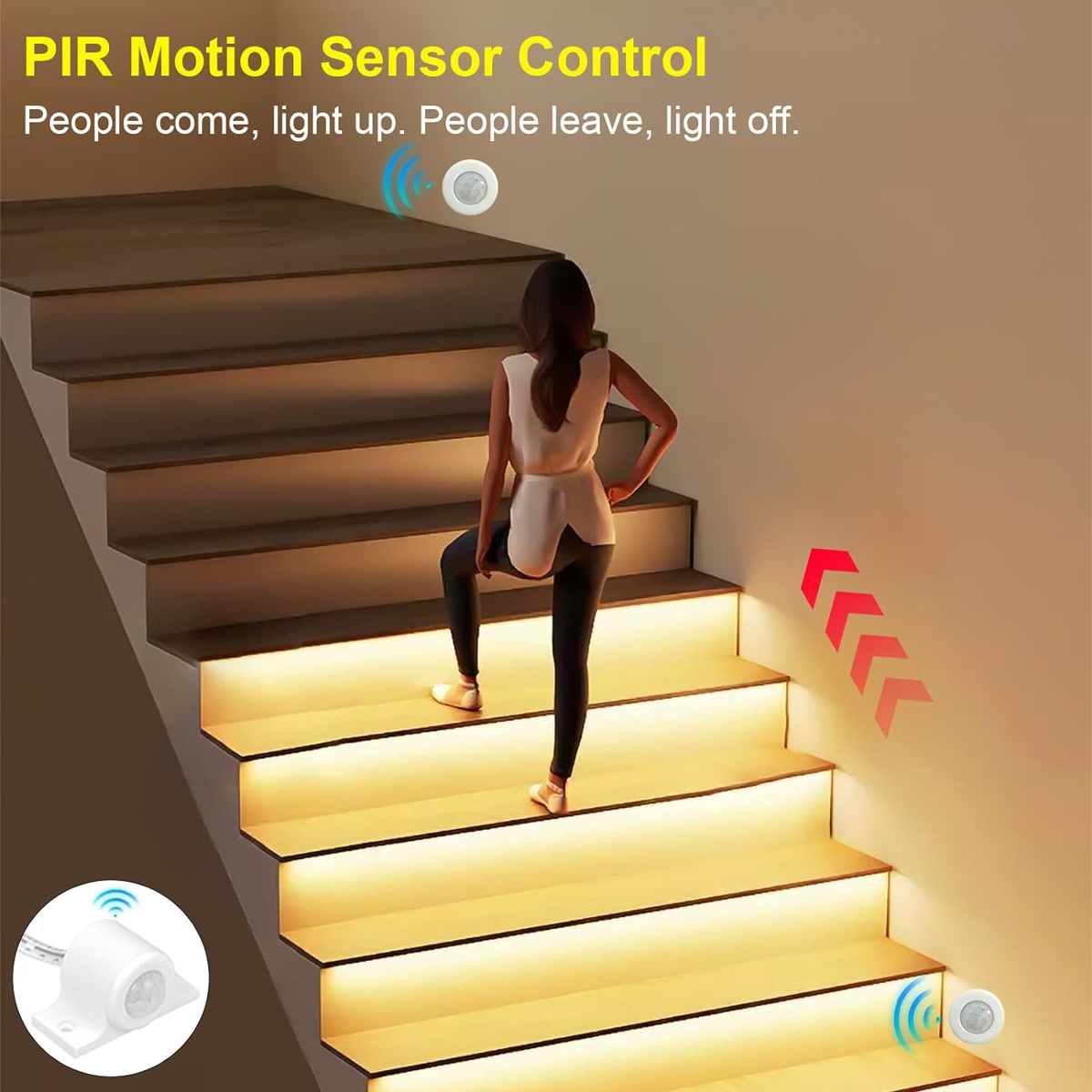
Smart stairway lighting solves this. Motion sensors detect when someone approaches the stairs and turn on just the right amount of light — enough to see each step, not enough to blind you at 2 AM. And it turns off automatically 30 seconds later.
Why Stair Lighting Matters More Than You Think
Beyond safety, smart stair lighting is genuinely convenient:
- No more fumbling for light switches — When you’re carrying laundry or a sleepy kid, you can’t reach the switch. Motion-activated lights mean you never have to.
- Night mode — Dim, warm lighting for middle-of-the-night trips that doesn’t wake up the whole house.
- Guest-friendly — Overnight guests don’t know where your light switches are. Automated lights remove the guesswork.
- Ambient beauty — LED strip lighting on stairs looks fantastic. It’s one of those upgrades that makes your home feel premium.
Three Approaches to Smart Stair Lighting
1. Motion-Activated Night Lights (Cheapest, 15 to 30 Dollars)
Stick battery-powered motion lights on the wall at the top and bottom of your stairs. They turn on when they detect motion and turn off after 30 seconds. No wiring, no hub, no app. Just stick and go.
- Mr Beams Wireless LED — About 15 dollars each. Battery-powered, motion-activated, weatherproof (works for indoor and outdoor stairs). Two or three units cover most stairways.
- GE Motion-Sensing Night Light — About 12 dollars. Plug-in (needs an outlet nearby). Slightly less flexible on placement but brighter than battery options.
This is the 15-minute solution. It’s not smart-home-connected, but it works immediately and costs almost nothing.
2. Smart Bulbs or Switches + Motion Sensors (30 to 60 Dollars)
Replace your existing stairway light bulb or switch with a smart version and add a motion sensor. When the sensor detects motion, the light turns on. When it doesn’t, the light turns off after a delay.
- Smart bulb approach — Put aPhilips Hue orSengled bulb in your stairway fixture. Add aHue motion sensor. Set up the motion sensor in the Hue app to turn the light on when motion is detected and off after 30 seconds of no motion. Cost: 25 to 40 dollars for the bulb and 40 dollars for the sensor.
- Smart switch approach — Replace the stairway light switch with aLutron Caseta or TP-Link Kasa switch. Add a motion sensor (Aqara or Ring). Use Alexa routines or Home Assistant to trigger the switch when the sensor detects motion. Cost: 20 to 35 dollars for the switch plus 20 to 30 dollars for the sensor.
The smart bulb approach is simpler to set up. The smart switch approach is better if you have multiple stairway lights on one circuit.
3. LED Strip Lighting (60 to 120 Dollars, Looks Amazing)
Install LED strip lights along the edge of each stair tread or under the handrail. This is the premium option — it looks like something from a high-end hotel and provides perfect step-by-step illumination.
- Basic LED strip —Govee or Philips Hue Lightstrip. Cut to length, stick under each stair nose or along the wall. Connect to a smart plug or controller for automation. Cost: 20 to 50 dollars per strip plus a smart plug or controller.
- Per-step sequential lighting — Advanced setup
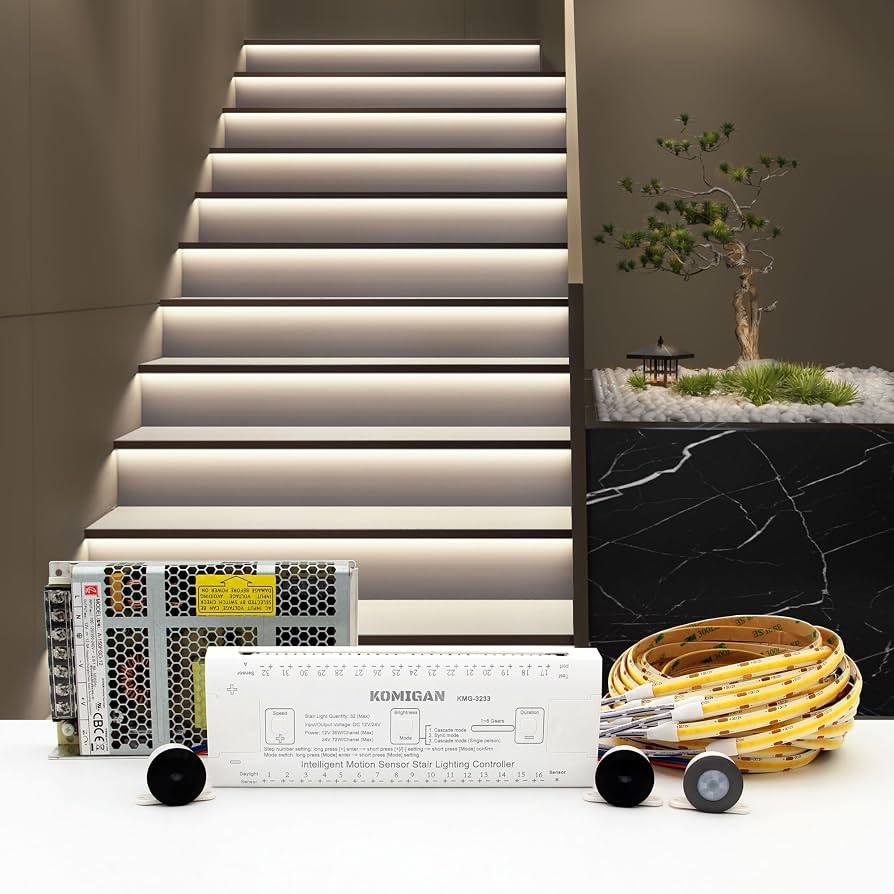
using addressable LED strips (WS2812B) that light up each step individually in sequence as you walk. Requires a controller (like a WLED device) and Home Assistant. Cost: 60 to 120 dollars plus setup time. This is the impressive-but-complicated option.
The Best Automation Setup
Day Mode (6 AM to 9 PM)
Full brightness when motion detected. This is your normal stair lighting for daytime use. Turns off after 2 minutes of no motion (you don’t need it during the day since natural light usually suffices).
Night Mode (9 PM to 6 AM)
10 to 20 percent brightness with warm color (2,700K or lower). Just enough to see the steps without wrecking your night vision or waking up other people. Turns off after 30 seconds of no motion.
Vacation Mode
Randomly turn on stairway lights between 6 PM and 10 PM to make the house look occupied. Simple, effective deterrent.
How to Set Up Motion-Triggered Stair Lighting in Home Assistant
Home Assistant gives you the most control over stair lighting behavior:
- Create two automations: one for day mode and one for night mode
- Use a time condition to switch between modes
- Add a “stairway” input boolean so you can manually override (disable automations when needed)
- Use the “delay” action to keep the light on for your preferred duration after motion stops
- Add a “grace period” so the light doesn’t flicker on and off if someone is standing still on the stairs
With Hue motion sensors, you get built-in temperature and ambient light readings. You can use ambient light to prevent the light from turning on during bright daytime when it’s not needed.
Placement Tips
- Sensor at top and bottom — Place motion sensors at both ends of the stairs so the light turns on regardless of which direction you approach from.
- Sensor angle matters — Point sensors along the stair path, not across it. You want to detect someone walking up or down, not walking past the stairs in the hallway.
- Avoid false triggers — Don’t point the sensor at a window (sunlight triggers some PIR sensors), at a heating vent (temperature changes trigger some sensors), or at a pet-level zone (unless you have pet-immune detection).
- LED strip placement — For under-tread installation, stick the strip on the vertical face (riser) about 1 inch below the tread above. This hides the strip from view while casting light down onto the step below.
Safety Considerations
- Never rely solely on automated stair lighting — Always keep a manual switch available. If the automation fails (sensor dies, hub reboots, Wi-Fi drops), you need to be able to turn the light on manually.
- Battery backup for sensors — Hue motion sensors and Aqara sensors run on batteries (2+ year life). If the power goes out, the sensors still work, but the lights won’t turn on unless the light itself has power (smart bulbs need the fixture powered, smart switches need the circuit powered).
- Test your setup — Walk the stairs in the dark and confirm the light turns on early enough that you can see the first step before you take it. If the sensor response is too slow, reposition it.
Bottom Line
Smart stairway lighting is a safety upgrade that also happens to look great and be incredibly convenient. Start simple: two motion-activated night lights for 25 dollars. If you like it, upgrade to smart bulbs or switches with motion sensors for 30 to 60 dollars. And if you want the premium look, LED strip lighting on each step creates a genuinely impressive effect for 60 to 120 dollars.
Either way, you’ll never trip on dark stairs again. And your 2 AM bathroom trips will be a lot less sketchy.
n
🏠 Get Your Free Smart Home Setup Checklist
Join our newsletter and get this free printable plus weekly tips.