This article contains affiliate links. We may earn a commission from qualifying purchases.
Some content on this site is AI-assisted and reviewed by our editorial team.
Matter 1.6 arrived on June 17, 2026, and it brings the kind of upgrades that make you wonder how we ever put up with the old way of doing things. If you have been living in the smart home world for any length of time, you already know the pain of devices that only work with one ecosystem, setups that require a computer science degree, and energy reports that tell you nothing useful. Matter 1.6 takes direct aim at all three of those frustrations.
This is not just another incremental spec bump. The Connectivity Standards Alliance packed real, consumer-facing features into this release — the kind that will change how you unbox and configure a new device within minutes of plugging it in. Let us walk through what is new, what it means for your smart home, and whether you should care.

What Is Matter 1.6 and Why It Matters
Matter is the universal smart home standard backed by Apple, Google, Amazon, Samsung, and dozens of other major players. Its goal is simple: any certified device should work with any ecosystem, period. Matter 1.6 is the sixth major revision of the standard, and it is easily the most consumer-friendly version yet.
Previous versions of Matter solved the interoperability problem at a basic level — a Matter-certified light bulb could be controlled from Apple Home, Google Home, or Amazon Alexa without needing separate hubs or integrations for each. But the experience of actually setting up those devices and sharing them across households remained clunky. Matter 1.6 addresses both of those pain points head-on, along with meaningful improvements to energy reporting and automation intelligence.
If you are building a smart home right now or planning to expand one, Matter 1.6 is the version that makes the whole project feel less like a hobby and more like a product.
NFC Setup: Tap to Connect
The headline feature of Matter 1.6 is NFC-based commissioning. Instead of scanning a QR code with your phone camera, fumbling with blurry printouts, or typing in numeric setup codes, you simply tap your phone against the device and the pairing process starts automatically.
If you have ever used a smart lock where the setup code was printed on a sticker inside the battery compartment, you already understand why this is a big deal. NFC commissioning removes the most common point of failure in the entire smart home setup process: human error during code entry.
Here is how it works in practice:
- Tap your phone to the device — the NFC handshake begins immediately, no app navigation needed beyond confirming the pairing
- Automatic credential transfer — your Wi-Fi and Thread network credentials are passed to the device securely through the encrypted NFC channel
- Ecosystem assignment — your phone asks which platform (Apple Home, Google Home, Alexa) should manage the device, and the rest is automatic
- No QR codes required — the old QR code method still works as a fallback, but NFC becomes the primary path on supported devices
This works on both iOS and Android, since both platforms have supported NFC reading in the background for years. Device manufacturers need to include an NFC tag in their hardware, which is a negligible cost increase per unit. Expect most new Matter-certified devices shipping in late 2026 and beyond to support NFC commissioning out of the box.

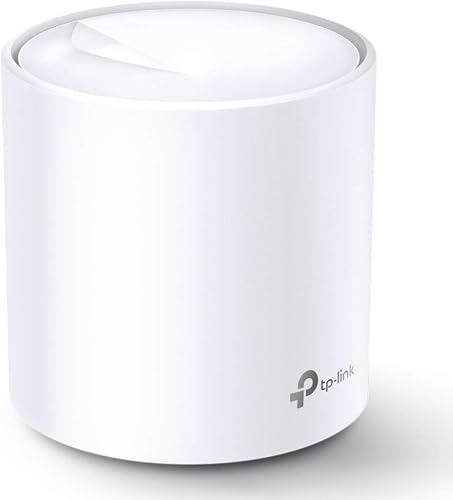
For a rock-solid Matter-ready mesh network to connect your new NFC-paired devices, the TP-Link Deco X20 is a strong choice — it supports Thread and Wi-Fi 6, covering both protocols Matter relies on.
Joint Fabric: Share Devices Across Ecosystems
This is the feature that smart home enthusiasts have been begging for since Matter was first announced. Joint Fabric allows you to share a single Matter device across multiple ecosystems simultaneously — not just hand off control between them, but have them co-manage the device at the same time.
Here is the scenario this solves: You have an Apple Home setup in your living room because you love the Siri integration and HomeKit cameras. Your partner prefers Google Home for the kitchen and bedroom. Under Matter 1.5 and earlier, sharing a device between both ecosystems was technically possible through Matter’s multi-admin feature, but it was slow, required manual re-pairing on each platform, and often broke when device firmware updated.
Joint Fabric in Matter 1.6 makes this seamless:
- One device, multiple controllers — a single smart lock or thermostat can be actively managed by Apple Home, Google Home, and Amazon Alexa at the same time
- Shared state — if you lock the door from Apple Home, Google Home immediately reflects the locked status without polling or delay
- Independent automations — each ecosystem can run its own automations against the shared device, so a Google Home routine and an Alexa routine can both trigger from the same motion sensor
- No re-pairing needed — once a device is shared via Joint Fabric, it stays shared across firmware updates and app reinstalls
This is particularly useful for smart locks, which are often the most contested device in a multi-person household. The Yale Assure Lock 2 already supports Matter and is one of the best candidates for cross-ecosystem sharing — everyone in the house can control it from their preferred platform without compromising on features.

Energy Management Gets Real
Matter has included basic energy reporting since version 1.2, but it was limited to simple power measurement on a few device types. Matter 1.6 dramatically expands the energy management framework, adding support for:
- Real-time power draw with sub-watt precision on supported devices
- Historical energy consumption data accessible through your chosen ecosystem app
- Time-of-use pricing integration — your smart home can factor in electricity rate schedules when deciding when to run energy-intensive devices
- Energy disaggregation — a single energy-monitoring device can report consumption broken down by individual circuits or connected appliances
- Carbon awareness — automations can be configured to run when grid carbon intensity is lowest, not just when electricity is cheapest
For whole-home energy monitoring, pairing a Matter-enabled system like the energy monitoring devices available on Amazon with your existing smart home setup gives you visibility into where your electricity is actually going — no more guessing whether the AC or the dryer is the monthly culprit.
The practical impact here is significant. Instead of your smart home just being a collection of remote-controlled switches, it becomes an active participant in managing your energy usage. A Matter 1.6-certified smart plug can report that your space heater is drawing 1,500 watts, and your thermostat can factor that into its heating decisions to avoid wasted energy.
Context-Aware Automations
Matter 1.6 introduces a new automation framework that goes beyond simple “if this, then that” triggers. The new context-aware system allows devices to share environmental state information that automations can use as conditions.

What this means in practice:
- Occupancy sensing — multiple sensors throughout the home can contribute to a shared occupancy model, so your lights do not flick off because one sensor in the hallway timed out
- Ambient conditions — temperature, humidity, and air quality sensors feed a shared environmental state that any Matter device can read
- Time and location context — automations can reference sunrise/sunset, household member presence, and custom time windows without needing a separate automation engine
- Device precedence — when multiple automations conflict (two routines both trying to set the thermostat), Matter 1.6 defines clear precedence rules so the system behaves predictably
The key difference from previous versions is that context is now shared across devices rather than siloed within each one. Your smart thermostat does not need its own motion sensor if your smart lights already have one — it can read the occupancy state from the lighting cluster and adjust accordingly.
Which Devices Support Matter 1.6?
Matter 1.6 is a software standard, so existing Matter devices can be updated to support it through firmware updates — no new hardware required in most cases. However, a few features do have hardware dependencies:
- NFC commissioning requires an NFC tag in the device, which some older Matter 1.0-1.3 devices do not include
- Energy disaggregation requires compatible power measurement hardware
- Thread networking remains the recommended transport, so devices need a Thread radio (most Matter-certified devices already have one)
Major manufacturers that have committed to Matter 1.6 firmware updates include:

- TP-Link — Deco mesh routers and Tapo smart home devices
- Ring — Alarm systems and contact sensors (the Ring Alarm 8-piece kit is a top pick for Matter-enabled home security)
- Yale — Assure Lock 2 and newer models
- SimpliSafe — selected sensors and the base station (SimpliSafe systems are rolling out Matter support throughout 2026)
- Nanoleaf — light panels and bulbs
- Ecobee — thermostats
If you have a device that is Matter-certified but has not received a 1.6 update yet, check the manufacturer’s app or support page. Most major brands are rolling updates through the third quarter of 2026.
When Will Consumers Actually Get It?
This is always the tricky question with Matter releases. The standard was published on June 17, 2026, but that does not mean your devices updated the next day. Here is the realistic timeline:
- Software features (Joint Fabric, context-aware automations, energy reporting improvements) — rolling out through the rest of 2026 as device manufacturers test and release firmware updates
- NFC commissioning — new devices shipping in Q4 2026 will include NFC tags; existing devices without NFC hardware cannot be updated to support this feature
- Ecosystem support — Apple Home, Google Home, and Amazon Alexa will add Matter 1.6 features in app updates throughout summer and fall 2026
The good news is that the CSA has been working with manufacturers for months before the public release, so many devices already have firmware ready to go or in final testing. The bad news is that “Matter 1.6 support” will be inconsistent across brands for the first few months, just as it was with previous versions.
Honest Assessment: Should You Upgrade?
If you already have a Matter-enabled smart home, the answer is yes — but do not expect miracles overnight. The firmware updates that bring Matter 1.6 features will roll out gradually, and ecosystem app updates take time to propagate to every user. The improvements are real and meaningful, especially Joint Fabric and energy management, but they are additive rather than transformative.
If you are starting a smart home in 2026, Matter 1.6 makes the decision much easier. Buy Matter-certified devices, tap your phone to set them up, and do not worry about which ecosystem to commit to — you can switch or share later. That is the promise that Matter has been working toward, and version 1.6 finally delivers it convincingly.
The one caveat: NFC commissioning is a hardware-dependent feature, so if that specific capability matters to you, look for devices that explicitly advertise NFC setup support rather than assuming all Matter 1.6 devices will have it.
Bottom Line
Matter 1.6 is the most practical release of the standard yet. NFC setup eliminates the single most frustrating part of smart home onboarding. Joint Fabric finally delivers on the promise of true cross-ecosystem device sharing without the friction that made earlier multi-admin features feel like a proof of concept. Energy management has graduated from a curiosity to a genuinely useful tool for understanding and reducing household power consumption. And context-aware automations make smart homes feel less like a collection of individual triggers and more like a cohesive system.
The standard is maturing. Each release closes real gaps that consumers hit in daily use, not just checklist items for the spec sheet. If you have been waiting for Matter to get good before investing in a smart home, version 1.6 is a reasonable starting point. Just remember that the features land on your devices when manufacturers push firmware updates, not when the CSA publishes the spec.
n
My take: Matter 1.6 is the version that fixes the part everyone actually complains about — setup — with NFC tap-to-pair and cleaner device sharing. If you’re mid-build, it’s the first release where buying certified-only is a fully safe default, not a compromise.
Related guides
- Smart Home for Pet Owners: 8 Devices That Keep Your Pets Safe
- Smart Home for Renters: 10 Devices That Wont Cost You Your Deposit
- Smart EV Charging at Home: How to Save 30 to 50 Dollars a Month
- Smart Home for Seniors: What Helps (And What Creates More Problems Than It Solves)
- Best Smart Blinds and Curtains 2026: Complete Buying Guide
🏠 Get Your Free Smart Home Setup Checklist
Join our newsletter and get this free printable plus weekly tips.
Frequently Asked Questions
What’s new in Matter 1.6?
The headline is NFC tap-to-connect commissioning — tap your phone to the device and pairing starts, replacing the QR-code fumbling and sticker-hidden setup codes that caused most setup failures. Beyond that: a smoother multi-admin experience for sharing devices across households and ecosystems, better energy reporting, and automation-intelligence upgrades. It shipped June 17, 2026 as the sixth major revision of the standard.
Does NFC setup really matter?
More than it sounds — human error during code entry is the most common failure point in the entire setup process, and NFC commissioning removes it. Your Wi-Fi and Thread credentials transfer through the encrypted NFC channel, so the device joins your network without you typing anything. If you’ve ever fished a setup code out of a lock’s battery compartment, you understand immediately.
Should I care about Matter 1.6 if I already have devices?
If you’re buying or expanding, yes — previous versions solved basic interoperability (one bulb, any ecosystem), but setup and cross-household sharing stayed clunky. 1.6 makes the out-of-box experience feel like a product instead of a hobby. Existing certified devices get the improvements via firmware as manufacturers update.
Liked this guide? Get the next one in your inbox — the smart home starter checklist is free too.
✓ You're in — check your inbox.
No spam. Unsubscribe anytime. We never share your email.
Price Check
Prices verified via our product tracker. Updated Sep 27.
| Yale WiFi Smart Lock Deadbolt with Keypad, Keyless Entry, | $259.99 | 3.7★ (1,408) |
| Kasa Matter Smart Plug with Energy Monitoring, KP125MP4, 1 | $44.99 | 4.3★ (2,258) |
| Ring Alarm 8-piece kit (2nd Gen) – home security system | $329.98 | 4.7★ (18,068) |
As an Amazon Associate we earn from qualifying purchases.