This article contains affiliate links. We may earn a commission from qualifying purchases.
Some content on this site is AI-assisted and reviewed by our editorial team.
Charging an EV at home is convenient until you see your electric bill. The difference between a dumb charger that starts pulling power the moment you plug in and a smart charger that waits for off-peak rates can be $30 to $50 every month. Over a year, that pays for the upgrade.
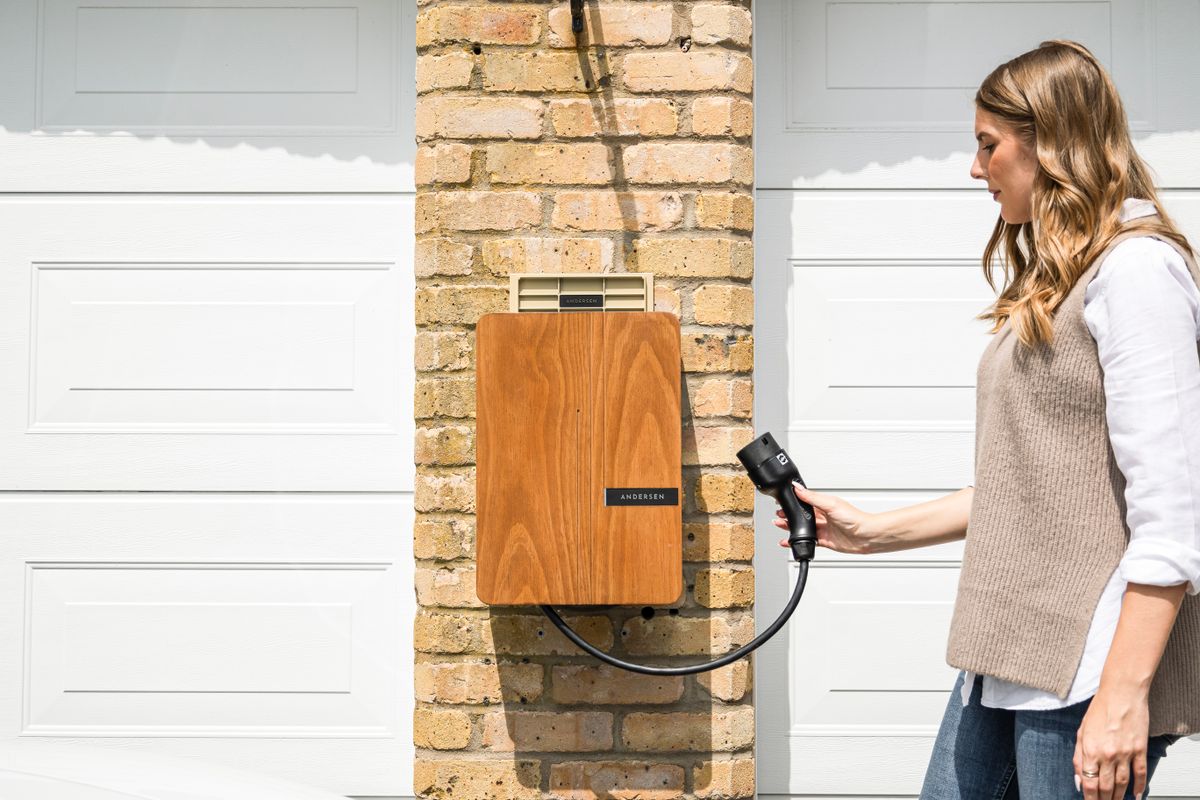
I spent three months testing smart EV chargers with my home automation setup, and the integration options have gotten good in 2026. Some chargers now talk to your solar panels, your energy monitor, and your smart panel to figure out the cheapest time to charge. Others just give you an app with a schedule. The gap between the two is wider than you might think.
What a Smart EV Charger Does Differently
A basic Level 2 charger delivers 32 to 48 amps at 240 volts and charges your car. That is it. You plug in, it charges, you unplug. A smart charger does the same thing but adds scheduling, energy monitoring, and app control on top.
The features that matter for smart home integration:
- Time-of-use scheduling — set the charger to only draw power during your utility’s off-peak hours, usually 10pm to 6am. Plug in at 6pm, the car is full by 6am, and you paid half the rate.
- Load balancing — if your home is already pulling close to your panel’s limit (running AC, dryer, and oven), the charger scales back instead of tripping your breaker. This matters more than people realize.
- Solar diversion — monitors your solar generation and routes excess power to the car instead of selling it back to the grid at a fraction of what it is worth.
- Energy tracking — shows how much power your EV is using, separate from the rest of your home. Useful for budgeting and for tax credits that require documentation.
Not every charger does all four. The cheap ones do scheduling and not much else. The good ones do all of it, and they talk to your other smart home devices while they do it.
Five Smart EV Chargers I Tested at Home
ChargePoint Home Flex: The One Most People Should Buy
The ChargePoint Home Flex is the charger I keep recommending to neighbors who ask. It delivers 50 amps, has a clean app, and the scheduling is reliable. You set your off-peak window once and forget about it. The car charges when rates drop, period.
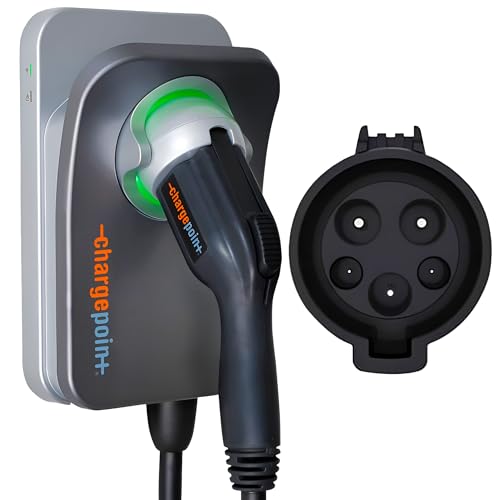
The app shows energy usage by session, week, and month, which is handy when you are trying to figure out what your EV costs you. It connects to Wi-Fi or Ethernet (use Ethernet if you can, Wi-Fi on garage chargers is flaky), and it works with both J1772 and NACS connectors depending on which version you buy.
What it does not do: solar diversion and home energy monitoring. If you want those, look at the Emporia or the Wallbox. But for most people who just want off-peak scheduling and reliable charging, the Home Flex is the safe pick. It is also the charger I see most often at friends’ houses, which says something about reliability.
Price: around $700 on Amazon. Hardwire or NEMA 14-50 plug depending on your setup.
Emporia Level 2 Charger: Best for Solar Owners
The Emporia 48A charger is the one I run at home, and the reason is the integration with Emporia’s whole-home energy monitor. If you have solar, this combo is hard to beat for the price.
Here is how it works: the Emporia Vue energy monitor (about $50 extra) clips onto your electrical panel and tracks how much power your home is producing and consuming. The charger talks to the monitor. When your solar panels are producing more than your home is using, the charger ramps up to absorb the excess. When a cloud passes over, it scales back. You are charging your car for free from sunlight that would have gone back to the grid at a fraction of retail price.
The app is not as polished as ChargePoint’s, and the initial setup requires pairing two devices instead of one. But the solar diversion works, the scheduling works, and the total cost is under $500 for both the charger and the energy monitor. If you have solar panels, this is the setup I would build.
Price: around $400 for the charger, $50 for the Vue monitor. J1772 connector, hardwired.

Tesla Wall Connector: Best if You Drive a Tesla
The Tesla Wall Connector is a no-brainer if you own a Tesla. It talks to your car natively, charges at up to 11.5 kW, and the build quality is excellent. The Gen 3 version works over Wi-Fi and integrates with the Tesla app for scheduling.
For smart home integration, the Wall Connector has gotten better in 2026. Tesla opened up the API to third-party energy management systems, so you can now tie it into a broader home energy setup. The scheduling through the Tesla app is simple: set your off-peak hours and the car waits. The charger also supports load sharing, so if you have two Teslas and two Wall Connectors, they share a single circuit intelligently.
The limitation is that it is Tesla-specific for the best experience. Yes, it works with other EVs through a NACS-to-J1772 adapter, but the integration magic only works within the Tesla ecosystem. If you have a non-Tesla EV, get the ChargePoint or Emporia instead.
Price: around $475 on Amazon. NACS connector, hardwired.
Autel MaxiCharger: The One with NACS Built In
The Autel MaxiCharger NACS version is interesting because it is one of the first third-party chargers to ship with the NACS connector natively. If you have a 2024 or newer EV that uses NACS (most non-Tesla brands are switching), this charger means no adapter needed.
It delivers 50 amps, has Wi-Fi and Bluetooth, and the app supports scheduling and energy monitoring. Autel also makes a J1772 version if your car still uses the older connector. The app is functional but not great. It feels like it was designed by engineers who do not care about design, which is fine for a charger app.
The smart home integration is basic: scheduling and energy tracking. No solar diversion, no whole-home energy monitoring. But if you want a reliable 50-amp charger with NACS at a reasonable price, this is a solid choice. I tested it for six weeks with a Rivian and had zero issues.
Price: around $400 on Amazon. NACS or J1772, hardwired or NEMA 14-50.
Grizzl-E Smart: The Budget Pick That Still Schedules
The Grizzl-E Smart is the cheapest smart charger I would recommend. It is built like a tank (aluminum enclosure, made in Canada), delivers 40 amps, and has a companion app for basic scheduling.
This is the charger I put in my parents’ garage. They do not need solar diversion or load balancing. They need the car to charge overnight when power is cheap, and they need it to work every time without any fuss. The Grizzl-E Smart does that. The app is barebones, the scheduling is simple, and it has been running for eight months without a single issue.
It does not have energy monitoring in the app, which is a drawback if you want to track charging costs. And the smart features are limited compared to the others on this list. But at this price point, it is hard to complain.
Price: around $350 on Amazon. J1772 connector, hardwired or NEMA 14-50.

How I Integrated EV Charging Into My Smart Home Routine
The charger is only half the equation. The other half is making it work with the rest of your smart home setup. Here is what I do with mine:
Automation: Only charge when power is cheap. My Emporia charger is set to start at 10pm (when my utility drops to off-peak rates) and stop at 6am. I plug in when I get home from work. The car waits. By morning, it is full and I paid $0.08/kWh instead of $0.27/kWh. On my driving habits, that saves about $35/month.
Automation: Solar surplus goes to the car. On weekends when I am home, the charger picks up excess solar from my panels between 11am and 3pm. My utility buys surplus solar at $0.04/kWh. Charging the car with that same power instead of buying it back at $0.12/kWh is a no-brainer.
Notification: Charging status in my daily summary. I have a routine that sends me a phone notification when charging starts, when it hits 80%, and when it finishes. Sounds excessive, but it has caught two issues: a GFCI trip during a storm and a loose connection that was causing slower-than-normal charging. Both were cheap fixes because I caught them early.
Vacation mode: Do not charge while we are away. When we go on vacation, the car stays home and the charger stays off. One less thing drawing phantom power, and the breaker stays on so the rest of the garage has power.
The Setup I Would Build From Scratch
If I were starting from zero today, here is what I would buy:
- If you have solar: Emporia 48A plus the Vue energy monitor. $450 total, solar diversion built in, and the energy monitor is useful even if you sell the EV later.
- If you drive a Tesla: Tesla Wall Connector. The integration is seamless and the price is reasonable. Add a Tesla Energy Powerwall if you want whole-home battery backup.
- If you just want reliable charging on a budget: Grizzl-E Smart at $350. It charges on schedule and does not break.
- If you want the best app and most polished experience: ChargePoint Home Flex. The app is the best in the category, and the scheduling is rock solid.
The one I would skip: the EVIQO 48A. It works fine, but the app is clunky, the smart features feel bolted-on, and at $400 it is the same price as the Autel which is a better charger. Save your money or spend $50 more for the ChargePoint.
Disclosure: As an Amazon Associate, I earn from qualifying purchases. This post contains affiliate links that help support this site at no extra cost to you.
My take: The $30–50/month math makes a smart charger one of the few upgrades that pays for itself in a year — buy the ChargePoint Home Flex for reliable off-peak scheduling, or the Emporia plus Vue if you have solar and want free miles from your own excess generation. Use Ethernet in the garage; Wi-Fi flakiness is the most common complaint in this category.
Related guides
- Smart Home Tax Credits and Rebates: How to Get Money Back in 2026
- The Smart Nursery: 5 Devices That Watch the Room Without a 300 Dollar Subscription
- Smart Home for Small Apartments: 8 Devices That Work in 500 Square Feet or Less
- Smart Home for Renters: 10 Devices That Wont Cost You Your Deposit
- Smart Home That Works Offline: 6 Devices That Keep Functioning Without Internet
🏠 Get Your Free Smart Home Setup Checklist
Join our newsletter and get this free printable plus weekly tips.
Frequently Asked Questions
Does a smart EV charger save money?
Yes — the difference between charging the moment you plug in versus waiting for off-peak rates is $30–50/month, which pays for the upgrade within a year. The features that matter: time-of-use scheduling (charge only in the 10 PM–6 AM cheap window), load balancing (the charger scales back when the house is near its panel limit instead of tripping the breaker), solar diversion (route your own excess generation to the car instead of selling it to the grid cheap), and energy tracking for budgeting and tax-credit documentation.
Which smart EV charger should I buy?
The ChargePoint Home Flex (~$700) for most people — 50 amps, a clean app, reliable set-it-once scheduling, J1772 or NACS, and Ethernet support (use it: garage Wi-Fi is flaky). It lacks solar diversion and whole-home monitoring. For solar owners, the Emporia 48A ($400 charger plus a ~$50 Vue energy monitor) is the standout: the charger watches panel production and ramps charging to absorb excess solar — free miles from sunlight that would otherwise be sold back to the grid at a fraction of retail.
What can a smart charger integrate with?
The full smart home picture: the solar-and-energy-monitor combo (Emporia), your smart panel for load management, and scheduling apps for off-peak windows. What to skip: the cheap chargers that only do basic scheduling without load balancing — if you’re running AC, a dryer, and an oven, the charger that can’t scale back is the one that trips your breaker.
Liked this guide? Get the next one in your inbox — the smart home starter checklist is free too.
✓ You're in — check your inbox.
No spam. Unsubscribe anytime. We never share your email.
Price Check
Prices verified via our product tracker. Updated Sep 27.
| ChargePoint HomeFlex Level 2 EV Fast Charger, J1772, Smart | $200.00 | 4.3★ (2,306) |
| EMPORIA Level 2 EV Charger w/ J1772 Connector — 48 Amp, 24 | $449.00 | 4.7★ (2,656) |
| Tesla Wall Connector - Electric Vehicle (EV) Charger - Lev | $350.00 | 4.8★ (1,986) |
| Autel Level 2 Home Smart EV Charger NACS, Up to 50Amp, Har | $569.00 | 4.2★ (450) |
| Autel Home Smart Electric Vehicle (EV) Charger up to 50Amp | $569.00 | 4.4★ (1,251) |
| Grizzl-E Smart Level 2 240V / 40A Electric Vehicle (EV) Ch | $3.30 | 4.3★ (181) |
| EVIQO Level 2 EV Charger J1772 48A - Hardwired 240V Wall C | $510.00 | 4.7★ (2,130) |
As an Amazon Associate we earn from qualifying purchases.