This article contains affiliate links. We may earn a commission from qualifying purchases.
Some content on this site is AI-assisted and reviewed by our editorial team.
Smart Home Winter Prep: 10 Things to Do Before the First Freeze
Winter is the season that tests your smart home the most. Pipes freeze, heating bills spike, power goes out, and short days mean your lights work overtime. The smart home devices that kept you comfortable in summer need different settings and routines for winter. Here are 10 things to adjust before the first freeze arrives.
1. Switch Your Thermostat to a Winter Schedule
Your summer thermostat schedule wastes money in winter. If your thermostat is still set to cool to 72 degrees during the day and 68 at night, you are paying for air conditioning you do not need while underheating your home at night.
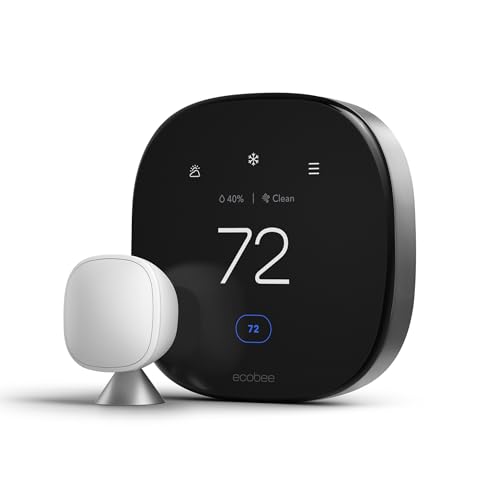
Create a new schedule on your Ecobee or Sensibo Sky with these targets:
- Morning (6 AM to 9 AM): 70 degrees. You are waking up and moving around. A warm house makes getting out of bed easier.
- Daytime (9 AM to 5 PM): 67 degrees. If you are at work, 64 degrees is fine. If you work from home, 67 is comfortable with a sweater.
- Evening (5 PM to 10 PM): 70 degrees. This is when you are home and relaxing.
- Night (10 PM to 6 AM): 65 degrees. Your body temperature naturally drops during sleep. 65 is the ideal sleep temperature year-round.

If you have a heat pump, do not set back more than 3 degrees at night. Heat pumps are efficient at maintaining temperature but inefficient at catching up. A 5-degree setback uses more energy than maintaining a steady 67 degrees.
2. Install a Smart Thermostat on Your Water Heater
Your water heater works harder in winter. Incoming water is colder, so the heater uses more energy to reach the same target temperature. A smart water heater controller or a smart plug on a tank heater lets you schedule heating for off-peak hours and monitor usage.
Set your water heater to 120 degrees, not 140. The lower setting saves 10 percent on water heating costs and is hot enough for showers and dishes. If your utility offers time-of-use rates, schedule the heater to run between 10 PM and 5 AM when rates are lowest.
3. Set Up Pipe Freeze Alerts
A frozen pipe that bursts costs an average of 5,000 dollars in water damage. A smart temperature and humidity sensor placed near pipes in unheated areas (crawl spaces, basements, exterior walls) can alert you before pipes freeze.

Set the alert threshold to 40 degrees. If the temperature near a pipe drops below 40, you receive a phone notification and can act before freezing occurs. Options: open cabinet doors to let warm air reach pipes, run a space heater in the area, or let faucets drip slightly to keep water moving.
For comprehensive protection, use a smart water leak detector near each pipe junction and water-using appliance. These detect leaks from burst pipes within seconds and can automatically shut off your water main if you have a smart shutoff valve.
4. Adjust Smart Blinds for Solar Heat Gain
In summer, you close blinds to block heat. In winter, you do the opposite: open south-facing blinds during the day to let sunlight warm your home naturally. This passive heating can raise room temperature by 3 to 5 degrees and reduce heating costs by 10 to 15 percent.

Program your motorized smart blinds with a seasonal routine:
- South-facing windows: Open at sunrise, close at sunset. This maximizes solar gain during the day and retains heat at night.
- North-facing windows: Keep closed. North windows receive minimal winter sun and lose heat through the glass.
- East and west windows: Open east in the morning for sunrise warmth. Close west in the afternoon if cold air is a bigger factor than afternoon sun.
Close all blinds at sunset to create an insulating air gap between the cold window glass and your room. This simple adjustment can reduce heat loss through windows by 30 percent.
5. Create a Winter Lighting Schedule
Short winter days mean your lights are on 14 to 16 hours per day instead of 8 to 10 in summer. This increases your lighting costs by 60 to 80 percent. Smart bulbs and lighting schedules can minimize the increase.
Set up a winter lighting routine:
- Outdoor lights: On at 4:30 PM, off at 6:30 AM. Use a smart outdoor plug or smart bulb with sunrise/sunset scheduling.
- Indoor lights: Dim to 40 percent from 4 PM to 6 PM during the transition from day to night. This reduces the shock of going from dark outdoors to bright indoors and saves energy.
- Bedroom lights: Warm white at 2700K after 8 PM. The warm color temperature signals melatonin production and helps with seasonal affective disorder.
- Wake-up lights: Set bedroom bulbs to gradually increase from 5 percent warm white to 60 percent cool white over 20 minutes starting at 6 AM. This simulates sunrise and makes winter mornings easier.
6. Reverse Ceiling Fans for Winter
If you have smart ceiling fans, reverse the direction to clockwise and run them on low speed. This pushes warm air down from the ceiling without creating a cooling breeze. Warm air rises, so a ceiling running clockwise can make a room feel 3 to 5 degrees warmer without touching the thermostat.

Most smart fans let you control direction from the app. If yours does not, use the switch on the fan housing. Set a routine that reverses all fans on November 1 and switches back on April 1.
7. Test Your Generator and Power Outage Prep
Winter storms cause more power outages than any other season. Before the first storm, test your backup power setup:
- Smart generator: Run a test cycle. Most smart generators have a monthly self-test feature. Verify it passes and that the transfer switch works.
- Battery backup: Check the charge level on any UPS or home battery system. Replace batteries that are more than 3 years old.
- Smart plugs: Label which plugs are on backup power so you know which devices stay running during an outage.
- Smartphone alerts: Set up notifications for power outages. Most smart home hubs can send a push notification when they lose power, using battery backup to send the alert.
If you do not have a generator, a portable power station can keep essential devices running for 8 to 12 hours. Connect your router, modem, and a smart phone charger to it. This keeps your smart home online and connected even during a grid outage.
8. Winterize Smart Outdoor Devices
Smart outdoor devices are designed for temperatures down to about 5 degrees Fahrenheit, but prolonged cold can reduce battery life and cause connectivity issues. Here is what to do:
- Security cameras: Bring battery-powered cameras indoors if temperatures drop below 10 degrees. Lithium batteries drain 3x faster in extreme cold. Wired cameras can stay outside.
- Smart doorbells: Verify the battery is fully charged before winter. Cold weather can reduce doorbell battery life from 3 months to 3 weeks. Consider a wired install if possible.
- Smart sprinkler controllers: Winterize your system by shutting off water and draining lines. Most smart controllers have a winterization mode that prevents the system from activating during freezing temperatures.
- Smart outdoor plugs: Verify they are rated for cold weather. If the rating is 14 degrees Fahrenheit or higher, bring them inside or protect them with a weatherproof cover.
9. Check Carbon Monoxide Detectors
Winter is peak carbon monoxide season because furnaces, fireplaces, and space heaters run constantly. Test your smart smoke and CO detectors before heating season starts.

Replace batteries in any detector that is more than 1 year old. If your detectors are more than 7 years old, replace them entirely. CO sensors degrade over time and become less sensitive after 5 to 7 years.
Set up a routine that tests all detectors on the first of each month. Most smart detectors have a self-test feature you can trigger from the app. This ensures you never forget a test.
10. Set Up a Winter Storm Alert Routine
Create a smart home routine that activates when a winter storm warning is issued. Use a weather alert service like IFTTT or Home Assistant with a weather integration to trigger the routine:
- Thermostat raises to 72 degrees to pre-warm the house before the storm hits
- Smart blinds close to insulate windows
- All smart plugs on essential devices switch to backup power if available
- Smart speakers announce the storm warning
- Outdoor cameras switch to continuous recording instead of motion-only
- Smart lights switch to a warm, calm color to reduce stress during the storm
This routine gives you a 2 to 4 hour head start on storm preparation. When the power goes out, your home is already warm, your devices are charged, and your cameras are recording.
The Bottom Line
Winter is the season where a smart home proves its value. The two highest-impact changes are adjusting your thermostat schedule and setting up pipe freeze alerts. Together, these prevent the most common winter problems: high heating bills and burst pipes. Everything else builds on that foundation. Spend one afternoon in October making these adjustments, and your smart home will keep you warmer, safer, and more efficient all winter long.
My take: Winter is the season that stress-tests the setup — flip the thermostat to a real heating schedule, put a $20 sensor on the pipes at a 40°F alert, and reverse the blinds to harvest sun by day and insulate at night. The pipe alert is the line item that protects a five-figure claim.
Related guides
- 10 Smart Home Vacation Automations That Work in 2026
- Smart Home Privacy Guide: What Your Devices Collect and How to Stop It
- Smart Home Setup for Your Garage and Workshop
- 12 Smart Home Mistakes Almost Every Beginner Makes (And How to Fix Them)
- Smart Home Gifts Under 60 Dollars: 7 Devices That Never End Up in a Drawer
🏠 Get Your Free Smart Home Setup Checklist
Join our newsletter and get this free printable plus weekly tips.
Frequently Asked Questions
How should I set my thermostat for winter?
A real heating schedule: 70°F morning (6–9 AM), 67°F daytime (64 if you’re out), 70°F evening (5–10 PM), 65°F night — the ideal sleep temperature year-round. One heat-pump exception: don’t set back more than 3 degrees at night; heat pumps are efficient at maintaining temperature and inefficient at catching up, so a 5-degree setback costs more than holding steady.
How do I prevent frozen pipes with smart devices?
A smart temperature sensor near pipes in unheated spaces (crawl spaces, basements, exterior walls) with the alert at 40°F — you get a phone notification in time to open cabinets, run a space heater, or let faucets drip. Add water leak detectors at pipe junctions; a burst pipe averages $5,000 in damage, and with a smart shutoff valve the water stops automatically within seconds.
What other winter prep matters?
Water heater settings (120°F not 140 saves 10% on water heating; schedule heating to off-peak hours), smart blinds flipped for solar gain — south windows open at sunrise and closed at sunset (passive heat worth 3–5 degrees and 10–15% off heating) — and a winter lighting schedule, since short days push lighting costs up 60–80%. Close all blinds at sunset: the insulating air gap cuts window heat loss by 30%.
Liked this guide? Get the next one in your inbox — the smart home starter checklist is free too.
✓ You're in — check your inbox.
No spam. Unsubscribe anytime. We never share your email.
Price Check
Prices verified via our product tracker. Updated Sep 27.
| ecobee Smart Thermostat Premium - WiFi, Siri & Alexa Built | $252.99 | 4.3★ (4,170) |
| Eve Energy (Matter) - Smart Plug, App and Voice Control, 1 | $43.95 | 4.2★ (432) |
| Aqara Zigbee 3.0 Motion Sensor P1 1 Pack, for Alert System | $19.99 | 4.2★ (827) |
| P3 P4400 Kill A Watt Electricity Usage Monitor - Low Tempe | $31.39 | 4.6★ (9,751) |
As an Amazon Associate we earn from qualifying purchases.