This article contains affiliate links. We may earn a commission from qualifying purchases.
Some content on this site is AI-assisted and reviewed by our editorial team.
If you’re running your air conditioner non-stop during a heat wave, your smart home can do more than just keep you comfortable — it can actively cut your energy bill. The right automations, sensors, and schedules can reduce cooling costs by 15-30% without you having to think about it. Here’s how to set that up.

The Problem: Your AC Is Working Harder Than It Needs To
Most homes waste cooling in three ways: the AC runs when nobody’s home, sunlight pours through untreated windows heating up rooms, and the thermostat doesn’t adjust based on what’s actually happening inside. A few smart devices fix all three.
1. Smart Thermostat Schedules That Actually Save Money
A smart thermostat is the single highest-ROI device for summer energy savings. The key isn’t just setting a schedule — it’s using the thermostat’s occupancy sensing and geofencing features so you’re not cooling an empty house.
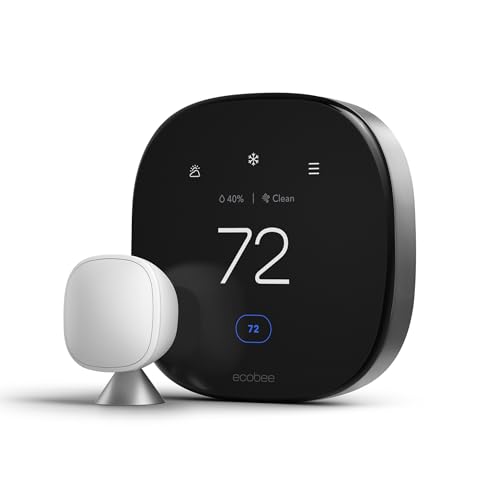
Home/Away automation: Set your thermostat to 78°F when you’re home and 85°F when you’re away. Most smart thermostats (Ecobee, Nest, Honeywell) have built-in motion sensors and can detect when you leave. Connect it to your phone’s location for geofencing, and the thermostat adjusts automatically — no schedule needed.
Top Pick: Check Price on Amazon →
Top Pick: Check Price on Amazon →
Top Pick: Check Price on Amazon →
Room-by-room optimization: If you have an Ecobee with remote sensors, place sensors in bedrooms and the living room. The thermostat will average the temperatures and prioritize rooms you’re actually using. If everyone’s in the living room watching a movie, it doesn’t need to cool the empty bedrooms to 72°F.
Top Pick: Check Price on Amazon →
Estimated savings: 10-15% on cooling costs. At average summer rates, that’s $30-60/month.
2. Smart Blinds: The Most Underrated Cooling Hack
Windows are where most heat enters your home during summer. Direct sunlight through a single window can add the equivalent of a 1,000-watt space heater to a room. Smart blinds that close automatically during peak sun hours can dramatically reduce your AC load.
The setup:
- Schedule: Blinds close at 11 AM (when sun gets intense) and open at 7 PM (when it cools down)
- Temperature trigger: If you have a temperature sensor near the window, set blinds to close when the room hits 75°F
- Sunrise/sunset automation: Use your smart home platform’s sunrise/sunset variable to automatically adjust based on actual daylight
Even basic smart blinds — like IKEA’s FYRTUR at $135 — can pay for themselves in one summer if they reduce AC usage by even 1-2 hours per day.
Estimated savings: 10-15% on cooling costs. Combined with a smart thermostat, you’re looking at 20-25% total reduction.

3. Smart Plugs on Heat-Generating Devices
This one surprises people: electronics and appliances generate heat, and that heat makes your AC work harder. A gaming PC left running, a TV in standby mode, a desktop computer, even chargers — they all produce heat that your AC has to counteract.
What to put on smart plugs:

- Desktop computers — Turn off when not in use. A running PC adds 200-500 watts of heat
- Gaming consoles — PS5 and Xbox both draw 1-3 watts in standby, but they also have instant-on features that draw more. Put them on a schedule
- Extra monitors — If you work from home, your second monitor doesn’t need to be on during lunch or meetings where you’re not looking at it
- Space heaters — Yes, people forget and leave them plugged in. A smart plug with a schedule ensures they can’t turn on during summer
- Towel warmers — If you have a smart bathroom, these get left on constantly and produce significant heat
Use a smart plug like the IKEA TRETAKT ($12) or TP-Link Tapo ($15) for each device. Schedule them to turn off when you leave for work and on when you get home.
Top Pick: Check Price on Amazon →
Top Pick: Check Price on Amazon →
4. Ceiling Fan + Thermostat Coordination
Ceiling fans don’t lower the temperature of a room — they make you feel cooler by moving air across your skin. This means you can set your thermostat 4°F higher and feel just as comfortable, which saves significant energy.
The automation: If you have a smart ceiling fan (or a smart switch controlling a regular fan), set it to turn on when the thermostat reaches 74°F and turn off when you leave the room. Pair this with a thermostat schedule that sets the target temperature to 82°F instead of 78°F when the fan is running.
The math: raising your thermostat by 4°F can reduce cooling costs by 10-15%. The fan uses about 15 watts — your AC uses 3,000+ watts. The trade-off is obvious.

5. Window Sensors for Open-Window Detection
One of the biggest AC wastes is cooling a house while windows are open. Whether it’s morning fresh air that you forgot to close before leaving, or a breeze that felt nice at 8 AM but becomes a heat source by noon, open windows sabotage your cooling.
The setup: Put contact sensors (IKEA PARASOLL at $10 each) on the windows you open most. Create an automation: if a window is open for more than 15 minutes AND the outdoor temperature is above 80°F, send a notification to your phone. If you have a smart thermostat, have it pause cooling until the window closes.
This is especially useful if you have kids or roommates who open windows and forget them. A simple “Hey, the living room window is still open and it’s 85°F outside” notification can save hours of wasted cooling.
6. Routine: The “Leaving for Work” Cooling Shutdown
Here’s a single routine that combines everything above. Set this up in Alexa, Google Home, or Apple Home, and trigger it when you leave (geofence or a button press):
- Thermostat → 85°F (away mode)
- Smart blinds → Close (block sunlight)
- Smart plugs → Off (kill heat from electronics)
- Ceiling fans → Off (nobody home to feel them)
- Window sensors → Active (alert if any open)
Then a “Coming Home” routine 20 minutes before you arrive:
- Thermostat → 78°F (start cooling)
- Ceiling fans → On in living room and bedroom
- Smart plugs → On (computer, etc.)
- Blinds → Open in rooms you’ll use, stay closed in sunny west-facing rooms
This single pair of routines can save 15-20% on summer cooling without you ever having to think about it.
7. Energy Monitoring: See What’s Actually Using Power
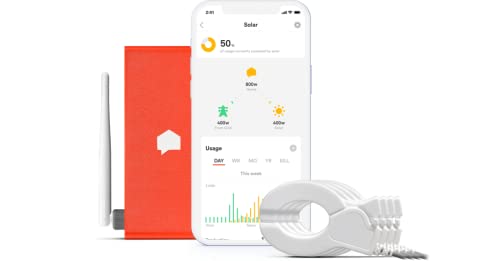
If you want to know exactly where your electricity is going, add a whole-home energy monitor like Emporia Vue ($70) or Sense ($300). These install in your electrical panel and show real-time energy usage by device. You might discover your old chest freezer in the garage is using $30/month, or that your AC is working harder than it should because the filter needs changing.
Top Pick: Check Price on Amazon →
Top Pick: Check Price on Amazon →
Pair the energy monitor with your smart thermostat’s usage reports, and you can see exactly how much each degree of cooling costs. Some thermostats even suggest optimal temperature settings based on your utility rates and usage patterns.
Cost Breakdown: What to Buy First
If you’re on a budget, prioritize in this order:
- 1. Smart thermostat — $80-250. Pays for itself in 1-2 summer seasons. This is the must-have.
- 2. Smart blinds (for your sunniest windows) — $135+ per window. Start with west-facing rooms.
- 3. Smart plugs — $12-15 each. Put 3-4 on your biggest heat-generating devices.
- 4. Window sensors — $10 each. Put on the 2-3 windows you open most.
- 5. Ceiling fan smart switch — $25-40. Optional but maximizes fan savings.
Total for a basic setup: roughly $150-300 (thermostat + 2 smart plugs + 2 window sensors). Estimated first-summer savings: $80-200. Most of this pays for itself before fall.
The Bottom Line
You don’t need every smart device to cut your summer cooling bill. A smart thermostat alone will make the biggest difference. Add smart blinds on your sunniest windows and a few smart plugs, and you’ve addressed the three main sources of cooling waste: empty-house cooling, solar heat gain, and unnecessary heat from electronics.
The beauty of these automations is that they run without you. Set them up once at the start of summer, and your home handles the rest. You come home to a cool house, your bill drops, and you never have to remember to adjust the thermostat or close the blinds. That’s the smart home actually being smart.
CleverHomeClub reviews smart home products and shares practical guides for homeowners and renters exploring home automation. Learn more at cleverhomeclub.com/about.
Related Reading
Get Our Free Smart Home Setup Checklist
Join 2,000+ smart home owners getting weekly tips and gear picks. No spam, unsubscribe anytime.
My take: The heat-wave playbook is thermostat discipline plus shade: 78°F with geofencing, blinds that close themselves before the sun peaks, and fans carrying 4 degrees so the AC runs less. The smart plugs on heat-generating gear are the surprise win — a running gaming PC is a space heater your AC pays to fight.
Related guides
- IKEA KAJPLATS Smart Bulbs Review: Matter Lighting Under Six Dollars
- Robot Vacuums Before Black Friday 2026: 5 Models Worth the Wait and 2 Discounts That Are Not
- Black Friday 2026 Smart Home Deals: The Price Floors Worth Waiting For
- Plug-In Energy Monitors: Find the Money Your Utility Bill Hides
- Sprinkler Controllers That Cut the Water Bill Without Rewiring Your Yard
🏠 Get Your Free Smart Home Setup Checklist
Join our newsletter and get this free printable plus weekly tips.
Frequently Asked Questions
How can a smart home cut cooling costs during a heat wave?
The thermostat first: 78°F home / 85°F away with occupancy sensing and geofencing so you’re never cooling an empty house — 10–15% off cooling costs, $30–60/month at summer rates. Then smart blinds (close at 11 AM, open at 7 PM, or triggered at 75°F) for another 10–15%, and fan coordination: set the thermostat 4°F higher when the fan runs — the fan uses ~15 watts against the AC’s 3,000+.
Do smart plugs help during summer?
Yes, in a counterintuitive way: heat-generating devices make your AC work harder, so put desktop PCs (200–500 watts of heat), game consoles, extra monitors, forgotten space heaters, and towel warmers on schedules or away-mode cutoffs via $12–15 plugs (IKEA TRETAKT, TP-Link Tapo). Eliminating that heat load is straight AC savings.
What about open windows sabotaging the AC?
That’s one of the biggest summer wastes — morning fresh air that turns into a heat source by noon while the AC keeps running. Window sensors plus a rule (window open more than a few minutes → thermostat to away or off) stop the AC from fighting the outdoors. Room-by-room Ecobee sensors complete the picture by cooling only the rooms actually occupied.
Liked this guide? Get the next one in your inbox — the smart home starter checklist is free too.
✓ You're in — check your inbox.
No spam. Unsubscribe anytime. We never share your email.
Price Check
Prices verified via our product tracker. Updated Oct 17.
| Google Nest Learning Thermostat (4th gen) + Nest Temperatu | $224.00 | 4.4★ (2,596) |
| Honeywell Home RTH9585WF Wi-Fi Smart Color Thermostat, 7 D | $179.99 | 4.3★ (20,099) |
| ecobee Smart Thermostat Premium - WiFi, Siri & Alexa Built | $252.99 | 4.3★ (4,170) |
| Kasa Smart Plug Mini with Energy Monitoring, KP115 | Wi-Fi | $22.99 | 4.5★ (17,790) |
| Emporia Vue 3 Home Energy Monitor - Smart Home Automation | $199.99 | 4.6★ (862) |
| Sense Energy Monitor with Solar – Track Electricity Usage | $50.00 | 3.9★ (904) |
As an Amazon Associate we earn from qualifying purchases.