This article contains affiliate links. We may earn a commission from qualifying purchases.
Some content on this site is AI-assisted and reviewed by our editorial team.
Smart Home Weather Stations: Are They Worth It or Just Expensive Thermometers?
You can check the weather on your phone in three seconds for free. So why would anyone spend 150 to 300 dollars on a smart home weather station? Because the weather app on your phone tells you what is happening at the airport 20 miles away. A personal weather station tells you what is happening on your roof, in your backyard, at your front door. And when it connects to your smart home, that local data can automate your sprinklers, adjust your thermostat, close your blinds, and alert you before a storm hits.

Here is what smart weather stations actually do, which ones are worth buying, and how to connect them to your smart home automations.
What a Smart Weather Station Actually Measures
A basic weather app gives you temperature and a chance of rain. A personal weather station gives you hyper-local real-time data across multiple metrics:
- Temperature: Every 2 to 5 seconds, not every hour like app data
- Humidity: Critical for mold prevention, allergy management, and HVAC efficiency
- Wind speed and direction: Real wind at your location, not a regional average
- Rainfall: Exact precipitation at your house, measured in hundredths of an inch
- UV index: Actual sun exposure for skin safety and solar panel optimization
- Barometric pressure: The single best predictor of incoming weather changes
- Air quality (on premium models): PM2.5 and VOC levels for health alerts
The difference between app weather and station weather is not trivial. If you garden, spray your lawn, or run outdoor irrigation, a 5-degree temperature difference or a wind shift can change your entire plan for the day. App data cannot give you that precision.
Three Smart Weather Stations Worth Buying in 2026
1. Ambient Weather WS-4000 (250 to 300 Dollars)
The Ambient Weather WS-4000 is the best all-around weather station for most homeowners. It connects to Wi-Fi out of the box and sends data to Weather Underground, Ambient Weather Network, and your smart home platform via IFTTT or direct API integration.
What makes it stand out:
- Ultrasonic wind sensor: No moving parts, which means no calibration and no wear. Traditional anemometers with cups wear out and stick after 2 to 3 years.
- Combo sensor array: Temperature, humidity, wind, rain, UV, and solar radiation in one unit. One mount, one installation.
- Indoor console: A color display that shows everything at a glance, plus indoor temperature and humidity.
- Smart home integration: Works with Alexa, Google Assistant, and IFTTT out of the box. Home Assistant integration is available through the Ambient Weather API.
Installation takes about 30 minutes. Mount the sensor array on a pole or rooftop bracket, plug in the indoor console, connect to Wi-Fi, and you are live. The console runs on AC power with battery backup, and the sensor array is solar-powered with a supercapacitor for night operation.
2. Tempest Weather System (330 Dollars)
The Tempest Weather System is the most advanced consumer weather station on the market. It uses haptic rain sensors instead of a tipping bucket, ultrasonic wind measurement instead of moving parts, and a built-in lightning detector with a 25-mile range.

Why it might be worth the extra money:
- No moving parts at all: No cups, no tipping bucket, no vane. Nothing to break, freeze, or get clogged by debris.
- Lightning detection: Get a phone alert 10 to 30 minutes before a thunderstorm reaches your location. This is genuinely useful for pool owners, boaters, and anyone who works outside.
- Solar-powered with battery backup: No wiring needed. The station runs entirely on solar with a battery that lasts up to 4 days without sun.
- Smart home ready: Direct integration with Home Assistant, SmartThings, and IFTTT. The Tempest API is well-documented and free.
The Tempest is the best choice if you live in an area with severe weather. The lightning detector alone makes it worth the premium for anyone in tornado alley, Florida, or the Gulf Coast.
3. Acurite Atlas (170 to 200 Dollars)
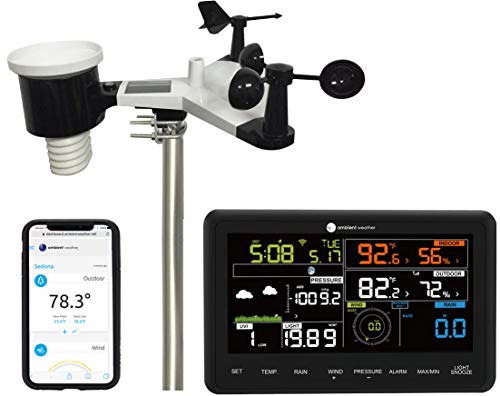
The Acurite Atlas is the budget pick that still delivers smart home integration. It costs about half of the Tempest and measures temperature, humidity, wind, rain, UV, and light intensity. The lightning detector is optional as an add-on.
What you get for the price:
- Reliable sensor array: Traditional cup anemometer and tipping bucket rain gauge. Accurate but requires maintenance every 12 to 18 months.
- Acurite Access hub: Connects to your Wi-Fi and uploads data to My Acurite and Weather Underground.
- Limited smart home integration: Works with IFTTT and Alexa through My Acurite. No native Home Assistant integration, but community plugins exist.
The Atlas is the right pick if you want local weather data without spending 300 dollars. Just plan to clean the rain gauge and check the wind cups twice a year.
How to Connect Your Weather Station to Smart Home Automations
Buying a weather station is only half the value. The other half is using the data to automate your home. Here are the automations that actually make a difference:
Irrigation Control
Connect your weather station to a smart sprinkler controller and your irrigation system will skip watering when it has rained in the last 24 hours. Most smart sprinklers already use forecast data, but local rainfall data is far more accurate. If your station measured 0.4 inches of rain overnight, your sprinklers stay off. If the forecast said rain but your station shows zero, the sprinklers run as scheduled.
This single automation can cut your water bill by 20 to 40 percent during the growing season. In dry climates, the savings are even higher because you avoid watering on windy days when most of the water evaporates before hitting the soil.
Storm Preparation
When your weather station detects a sudden barometric pressure drop (the most reliable indicator of an approaching storm), trigger a routine that:
- Closes smart blinds to protect windows from flying debris
- Turns outdoor lights on for visibility
- Sends a phone alert with the current wind speed and direction
- Switches security cameras to continuous recording
- Raises the thermostat a few degrees so the house stays warm if power goes out
This gives you a 15 to 30 minute head start before severe weather hits. In areas with frequent thunderstorms, this routine is genuinely lifesaving.

HVAC Optimization
Your thermostat uses indoor temperature to decide when to run the AC or furnace. But what if it is 95 degrees outside with 20 percent humidity versus 85 degrees with 70 percent humidity? The second scenario feels hotter and needs more cooling. Connect your weather station to your Ecobee or Nest thermostat through IFTTT or Home Assistant, and the thermostat can adjust its setpoint based on outdoor humidity and solar radiation.
In practice, this means your AC runs less on dry days (when evaporation keeps you comfortable) and more on humid days (when the air feels warmer than the thermometer reads). Expect 5 to 10 percent savings on cooling costs during summer.
Allergy Management
If your weather station has air quality monitoring, use it to control your smart air purifier. When PM2.5 levels rise above 35 (the EPA threshold for unhealthy air), automatically turn on the purifier at high speed. When levels drop below 20, switch it to low or off. This keeps your indoor air clean without running the purifier constantly.
The Bottom Line
A smart weather station is not for everyone. If you live in an apartment and only care about whether to bring an umbrella, your phone is fine. But if you own a home with a yard, a garden, an irrigation system, or a pool, a personal weather station pays for itself in water savings, energy savings, and storm preparation within the first year. The Ambient Weather WS-4000 is the best pick for most people. The Tempest is worth the extra money if you live in a severe weather area. Either way, connecting the data to your smart home automations is what turns a fancy thermometer into a genuinely useful tool.
My take: A weather station is worth it the day your automations start eating its data — sprinklers that skip a coming rain, blinds that close before the storm line arrives. The WS-4000’s no-moving-parts wind sensor is the reliability pick; without automations it’s an expensive thermometer.
Related guides
- Schlage Sense Pro: The First Smart Lock with True Hands-Free UWB Unlock
- Smart Home Security on a Budget: A Complete Guide Under $200
- Smart Home Bedroom Automation: 7 Devices That Helped Me Sleep Better
- Smart Blinds and Curtains: The Most Underrated Smart Home Cooling Hack for Summer 2026
- Smart Home Mail and Package Tracking: How to Know When Your Deliveries Arrive (Without Checking the Porch 10 Times)
🏠 Get Your Free Smart Home Setup Checklist
Join our newsletter and get this free printable plus weekly tips.
Frequently Asked Questions
Is a smart weather station worth it?
If your phone’s weather app drives real decisions — irrigation, lawn care, gardening, or storm prep — yes. The app tells you the weather at an airport 20 miles away; a personal station reports your actual roof and backyard: temperature every 2–5 seconds instead of hourly, exact rainfall in hundredths of an inch, real wind at your location, and barometric pressure, the single best short-term predictor. Automations then act on it: sprinklers that skip before rain, blinds that close before storms.
What should a smart weather station measure?
The core set: temperature, humidity (matters for mold prevention and HVAC efficiency), wind speed and direction (regional averages are useless for sprinkler or spray decisions), rainfall, and UV index. Premium models add PM2.5 and VOC air quality. A 5-degree difference or wind shift can change a gardening day entirely — that’s the precision the airport data can’t give you.
Which weather station should I buy?
The Ambient Weather WS-4000 ($250–300) for most homeowners — its ultrasonic wind sensor has no moving parts (no calibration, no wear, unlike cup anemometers), and it feeds Weather Underground plus your smart home via IFTTT or direct API. Budget stations cover the basics at half the price; pair whatever you buy with your irrigation and thermostat so the data actually automates something.
Liked this guide? Get the next one in your inbox — the smart home starter checklist is free too.
✓ You're in — check your inbox.
No spam. Unsubscribe anytime. We never share your email.
Price Check
Prices verified via our product tracker. Updated Sep 27.
| Tempest Weather Station with Built-in Wind Meter, Rain Gau | $349.00 | 4.2★ (2,193) |
| Ambient Weather WS-2902 Wi-Fi Smart Weather Station | With | $199.99 | 4.4★ (13,131) |
| Govee Smart Bluetooth Thermometer Hygrometer H5074, Mini H | $13.99 | 4.3★ (13,300) |
| PRO1 T721 Non-Programmable Wall Thermostat, 2H/1C Heat Pum | $49.99 | 4.5★ (721) |
| Levoit Air Purifier for Home Pets Bedroom Dorm Room, Smart | $149.98 | 4.6★ (127,989) |
As an Amazon Associate we earn from qualifying purchases.