
This article contains affiliate links. We may earn a commission from qualifying purchases.
Some content on this site is AI-assisted and reviewed by our editorial team.
Here’s the pitch every energy monitor company wants to sell you: “See where your electricity goes, and save hundreds a year!” Sounds great. The dashboard is gorgeous. The graphs are mesmerizing. You can check your phone at work and see exactly how many watts your house is pulling right now.
But then a month goes by. Your bill is… about the same. The novelty wears off. And that $300 monitor is sitting there, collecting dust on the same electrical panel it was supposed to help you optimize.
So which is it? Do energy monitors actually save you money, or are they just expensive toys that look cool on your phone?
The honest answer: they can save you money, but probably not the way the marketing suggests. Let’s break it down with real products, real numbers, and real opinions — no fluff.
What Energy Monitors Actually Do
Before we talk savings, let’s be clear on what these devices do. There are two categories:
Whole-House Monitors
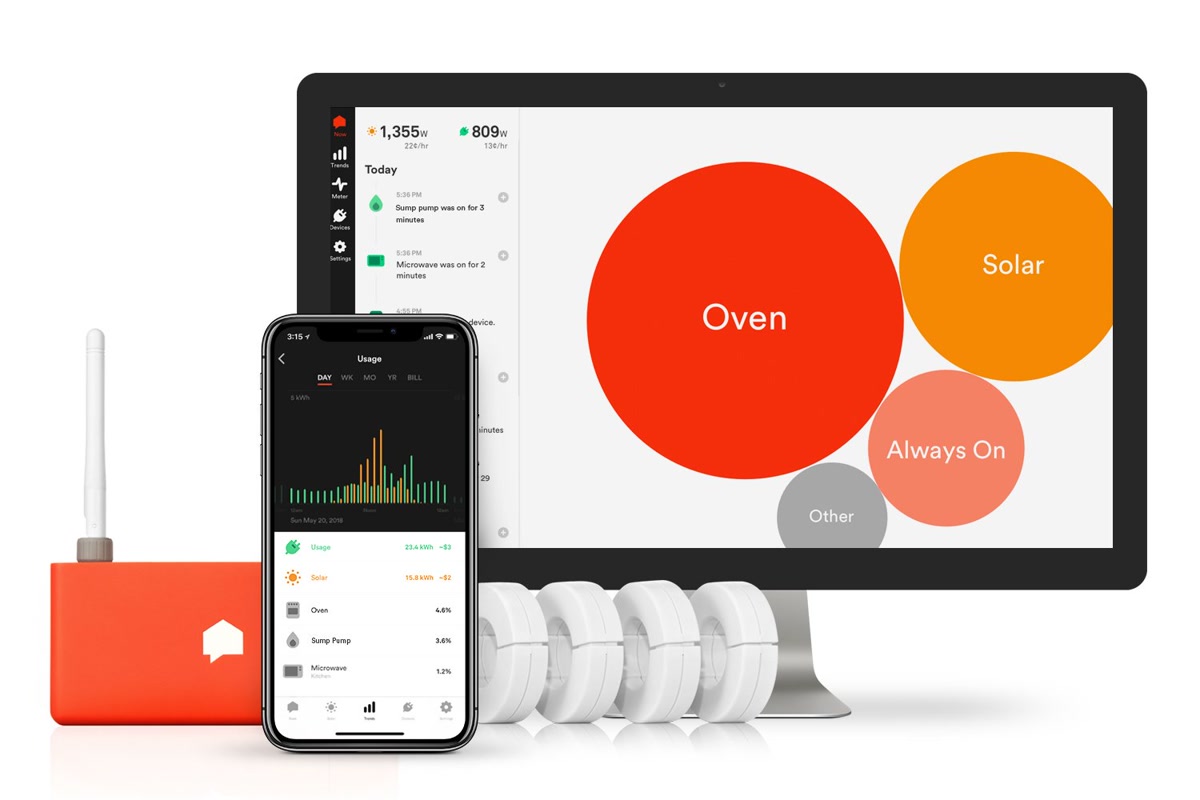
These clamp onto your electrical panel and measure everything flowing through your main power lines. They see your total household consumption in real time, and some use machine learning to identify individual devices by their electrical signatures.
- Sense Energy Monitor — The big name. Uses ML to auto-detect devices over time
- Emporia Vue 3 — Budget-friendly whole-house monitoring with circuit-level tracking
- Eyedro Home Energy Monitor — Simple, affordable, no-frills whole-house tracking
Plug-In Monitors
These sit between an outlet and a single device. They’re cheap and precise — but only track whatever’s plugged into them, not your whole house.
- Kasa Smart Energy Monitor (KP125M) — Smart plug with built-in energy tracking
- Aeotec Home Energy Meter — Z-Wave meter for Home Assistant users who want whole-house data without the cloud
The key difference: whole-house monitors give you the big picture. Plug-in monitors give you granular data on specific devices. The best setup uses both, but most people start with one or the other.
The Five Products, Compared
Sense Energy Monitor — Best for Automatic Device Detection
- Price: ~$300
- Type: Whole-house (panel clamp)
- Installation: Requires opening your electrical panel (or hiring an electrician)
- Best for: People who want the monitor to figure out what’s running without manual setup
- Link: Search Sense Energy Monitor on Amazon
Sense is the most popular whole-house energy monitor, and for good reason: its machine learning engine actually tries to identify individual devices by their electrical signatures. Over the first few weeks, it’ll discover your fridge, your HVAC, your dryer — sometimes even specific brands.
The detection isn’t perfect. It can take weeks to identify major appliances, and smaller devices (phone chargers, LED bulbs) often stay in the “Other” bucket forever. But when it works, it’s genuinely useful. Seeing “Your water heater ran for 3 hours today” hits different than seeing a flat number on your utility bill.
The downside: At $300, Sense is expensive. And it requires a cloud connection — no local API means it’s useless if Sense’s servers go down or the company goes under. For a privacy-conscious smart home, that’s a real concern. Check our smart home privacy guide if that matters to you.
Emporia Vue 3 — Best Budget Whole-House Monitor
- Price: ~$100 (Gen 3)
- Type: Whole-house with optional circuit-level clamps
- Installation: Same as Sense — panel clamp, but includes 8 circuit-level sensors
- Best for: Budget-conscious homeowners who want circuit-level detail
- Link: Search Emporia Vue 3 on Amazon
The Emporia Vue 3 is the value king. For a third of the Sense’s price, you get whole-house monitoring plus eight circuit-level sensors that tell you exactly what’s happening on individual breakers. That’s more granular data than Sense provides out of the box — you can literally see how much your HVAC circuit is pulling vs. your kitchen circuit vs. your dryer.
The tradeoff: no fancy ML device detection. Emporia shows you what’s happening on each circuit, and it’s up to you to figure out what’s on that circuit. But honestly? If you know which breaker goes where (and you should), circuit-level data is often more useful than Sense’s “we think this might be your fridge” guesses.
Emporia also offers solar monitoring, EV charger tracking, and a decent app. It’s not as polished as Sense, but it’s hard to beat at this price.
Eyedro Home Energy Monitor — Simple and Affordable
- Price: ~$100-130
- Type: Whole-house (panel clamp)
- Installation: Clamp-on, straightforward for DIYers comfortable with their panel
- Best for: People who want basic kWh tracking without subscription fees
- Link: Search Eyedro Home Energy Monitor on Amazon
Eyedro is the “does one thing well” option. No device detection. No smart home integrations to speak of. No subscription. It measures your total household electricity usage, shows it in a web dashboard, and that’s basically it.
If all you want is to see “I used 32 kWh today” and compare it to yesterday and last week, Eyedro does that job for half the price of Sense. The data is accurate, the setup is simple, and the ongoing cost is zero.
The catch: Without device-level data, you’re on your own to figure out why your usage spiked. Eyedro tells you something changed. It doesn’t tell you what.
Kasa Smart Energy Monitor (KP125M) — Best Plug-In Option
- Price: ~$15-20 per plug
- Type: Plug-in (single outlet)
- Installation: Plug it in. Done.
- Best for: Monitoring specific high-draw devices, or renters who can’t touch their panel
- Link: Search Kasa Smart Energy Monitor on Amazon
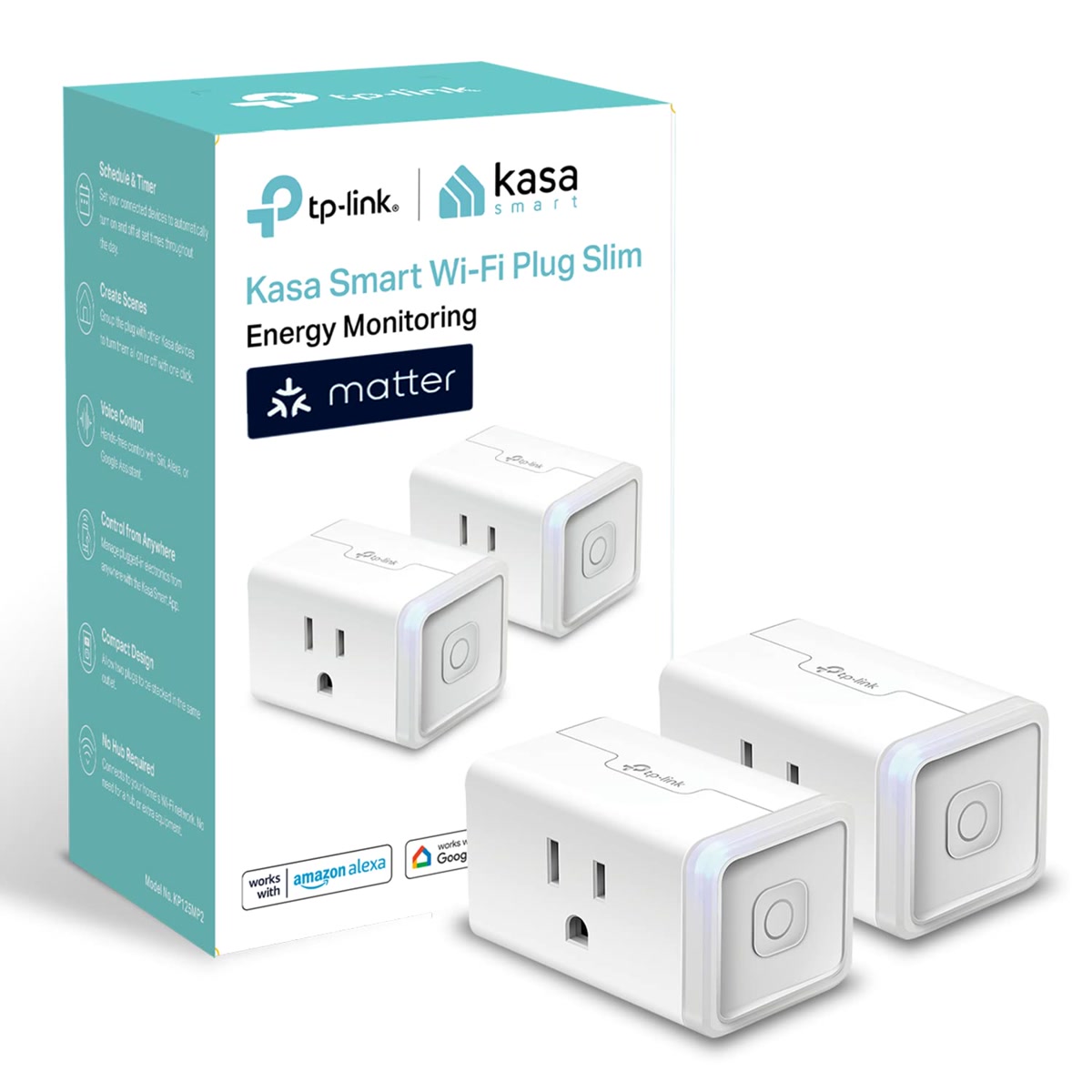
The Kasa KP125M is a smart plug with built-in energy monitoring. At $15-20, it’s the cheapest way to start tracking electricity. Plug it into the wall, plug your device into it, and the Kasa app shows you exactly how much power that device is drawing — in real time and over time.
This is the approach I recommend most people start with. Before dropping $300 on a whole-house monitor, spend $40 on two Kasa plugs and monitor your fridge and your entertainment center for a month. You’ll learn more from those two data points than you expect.
The limitation: You can only track what’s plugged into the Kasa. Your HVAC, water heater, and other hardwired appliances are invisible to plug-in monitors. But for renters who can’t (or won’t) open their electrical panel, this is the only game in town.
Also worth noting: Kasa plugs integrate nicely with smart home automations that save time, like scheduling vampire-power devices to turn off at night.
Aeotec Home Energy Meter — Best for Home Assistant Users
- Price: ~$60-80
- Type: Z-Wave whole-house meter (panel clamp)
- Installation: Panel clamp + Z-Wave pairing
- Best for: Home Assistant power users who want local, private energy data
- Link: Search Aeotec Home Energy Meter on Amazon
The Aeotec Home Energy Meter is a Z-Wave device that clamps onto your panel and feeds energy data directly into your Z-Wave hub — most commonly Home Assistant. No cloud. No subscription. No company servers between you and your data.
This is the pick for Home Assistant users who want the Energy Dashboard (which is excellent, by the way) populated with real data. The Aeotec feeds total consumption directly into HA, which then correlates it with your Ecobee smart thermostat, smart plugs, and any other energy-aware devices.
The catch: You need a Z-Wave stick and Home Assistant already set up. If you don’t know what those things mean, this isn’t the product for you. But if you’re already running Home Assistant vs SmartThings vs Hubitat and have a Z-Wave dongle, this is the cleanest way to get whole-house energy data into your dashboard without relying on anyone’s cloud.
Whole-House vs. Plug-In: Which Should You Get?
This is the question everyone asks, so let’s make it simple:
Get a whole-house monitor if: – You own your home and are comfortable with (or willing to hire someone for) electrical panel work – You want to see your total electricity picture, not just individual devices – You suspect something in your house is drawing way more than it should – You want to verify your utility bill is accurate – You’re planning to add solar panels or an EV charger
Get plug-in monitors if: – You’re a renter and can’t touch your electrical panel – You only care about 2-3 specific devices – You want to start cheap before committing to a full system – You want to automate devices based on their power draw (e.g., turn off a space heater that’s been running too long)
Get both if: – You’re a data nerd who wants the complete picture – You’re running Home Assistant and want to build the ultimate energy dashboard – You’re trying to optimize every watt (high electricity rates, off-grid, etc.)
For most people starting out: begin with plug-in monitors. The Kasa KP125M at $15-20 each gives you actionable data on your biggest draws. If that hooks you, upgrade to a whole-house monitor. If it doesn’t, you’re out $40 instead of $300.
How Much Can You Realistically Save?
This is the part where most articles lose the plot. They’ll quote you “up to 15% savings” without context. Let’s be real.
Direct Savings: 5-10 Percent (If You Act on the Data)
Energy monitors themselves don’t save you anything. They’re not like smart thermostats that automatically adjust your HVAC. They’re information tools. The savings come from what you do with that information.
Realistic direct savings from behavioral changes based on energy monitor data:
- Identifying and eliminating vampire loads: $20-50/year. This is the easy win. Discovering your old cable box pulls 25W 24/7 and putting it on a smart plug schedule saves real money. Smart plugs under 50 dollars can handle this.
- Fixing malfunctioning appliances: $50-200/year (one-time). If your fridge is pulling 3x what it should because the compressor is failing, an energy monitor will flag that immediately. This is one of the highest-ROI discoveries you can make.
- Optimizing time-of-use rate plans: $30-100/year (if your utility offers TOU rates). Seeing exactly when you use power lets you shift heavy loads to off-peak hours.
- Eliminating “always on” devices you forgot about: $10-30/year. The basement dehumidifier you set up last summer and never turned off. The heated towel rack. The space heater in the guest room.
Total realistic direct savings: $110-380/year. But that requires you to actually change behavior or take action based on the data. The monitor just tells you what’s happening. You have to be the one to unplug the thing or set up the automation.
Indirect Savings: The Real Value
The bigger savings come indirectly:
- Catching problems early. A water heater element that’s failing draws more power. A furnace that’s short-cycling shows up as unusual usage patterns. Catching these early can save hundreds in repair costs and prevent bigger failures. Pair this with smart water leak detectors for comprehensive home protection.
- Verifying your utility bill. Utility meters can be wrong. Having your own data means you can dispute unexpected spikes with actual numbers.
- Making informed upgrade decisions. An energy monitor tells you exactly how much your old fridge costs to run. If it’s $15/month, replacing it with a more efficient model might not make sense. If it’s $40/month, that’s a different story.
- Validating smart home investments. Did adding a smart thermostat actually reduce your HVAC usage? Your energy monitor will tell you, no guessing required.
The Payback Math
Here’s the honest payback timeline for each monitor:
- Sense ($300): At $110-380/year in savings, payback is 1-3 years. But only if you act on the data. If you just look at the pretty graphs, payback is never.
- Emporia Vue 3 ($100): Payback in 4-11 months. Much easier to justify, and the circuit-level data makes it easier to find savings.
- Eyedro ($100-130): Payback in 4-14 months for basic consumption tracking. But limited to total usage — harder to find specific savings without device data.
- Kasa KP125M ($15-20 each): Payback in 1-4 months per monitored device. The fastest ROI in this entire category.
- Aeotec HEM ($60-80): Payback in 2-7 months if you’re already using it to optimize Home Assistant automations. The data alone doesn’t save money, but automations based on it can.
Does the Data Actually Change Behavior?
This is the uncomfortable question. Let’s be honest: for a lot of people, the answer is no.
Here’s what typically happens:

- Week 1: You install the monitor, check the app obsessively, and discover that your dryer uses an absurd amount of power. You feel informed.
- Week 2-4: You notice a few things — the basement fridge is costing you $15/month, the TV setup draws 40W in standby. You put a couple things on smart plugs.
- Month 2-3: The novelty wears off. You stop checking the app daily. You’ve addressed the obvious stuff. The remaining savings require bigger changes (new appliances, HVAC upgrades) that you weren’t going to make just because an app told you to.
- Month 6+: The monitor becomes background infrastructure. It’s running, collecting data, but you’re not actively changing behavior based on it.
But that’s okay. The big wins happen in weeks 1-4: discovering the vampire loads, catching the malfunctioning appliance, confirming your smart thermostat is working. After that, the monitor becomes a set-it-and-forget-it safety net. If something weird happens — a device starts drawing way more than usual, or your baseline consumption creeps up — you’ll get an alert and can investigate.
The analogy I like: an energy monitor is like a scale. It doesn’t make you lose weight. But if you’re trying to lose weight, stepping on it regularly gives you the feedback loop you need. Without feedback, you’re guessing. With it, you can measure whether your changes are working.
Which Homes Benefit Most?
Energy monitors aren’t equally useful for everyone. Here’s who gets the most value:
High-Energy Homes (1,500+ kWh/month)
If your electricity bill regularly exceeds $150/month, an energy monitor will almost certainly find savings worth more than the device cost. More consumption means more low-hanging fruit. At this level, there are almost always devices drawing more power than you realize.
Homes with Older Appliances
If your fridge is 15 years old, your HVAC system was installed before efficiency standards improved, or you’re still running incandescent bulbs anywhere, an energy monitor will quantify exactly how much those relics are costing you. Sometimes the numbers are shocking enough to finally justify the upgrade.
Homes on Time-of-Use Rate Plans
If your utility charges different rates at different times, energy monitoring is essential. You can’t shift consumption to off-peak hours if you don’t know when you’re using power. This is where monitors earn their keep fastest.
Homes with Solar Panels
If you have solar, an energy monitor is almost mandatory. It tells you whether your system is producing what it should, helps you maximize self-consumption, and lets you verify your net metering credits are accurate. The Emporia Vue 3 has dedicated solar monitoring that makes this easy.
Homes Already Running Home Assistant
If you’re a Home Assistant user, the Aeotec Home Energy Meter integrates natively into HA’s Energy Dashboard. Combined with smart plugs for individual device tracking, you can build automations that actually respond to energy data — turn off devices when grid demand is high, dim lights when you’re approaching a peak pricing window, or send yourself a notification when daily consumption exceeds your target.
Homes That Benefit Least
- Low-energy apartments (under 500 kWh/month) — there’s just not enough consumption to optimize. A couple Kasa plugs on your biggest draws will tell you everything you need.
- Brand-new, energy-efficient homes — if everything is already modern and efficient, the monitor will mostly confirm that you’re doing fine. Nice to know, but not actionable.
- People who won’t change behavior — if you’re not willing to unplug things, set up automations, or replace aging appliances, the data is just data. Beautiful graphs on your phone, but no savings in your pocket.
Installation: How Hard Is It, Really?
This is where people get nervous. Let’s demystify it.
Whole-House Monitors (Sense, Emporia, Eyedro, Aeotec)
All four require opening your electrical panel. Here’s what that means:
- Turn off the main breaker. This kills power to your whole house. Yes, you’ll be without power for 15-30 minutes. Yes, it’s safe as long as the main breaker is off.
- Clip the current sensors (CT clamps) around the main power lines. These are the two thick wires coming from your meter. The clamps snap around them without cutting or stripping any wires. You do NOT need to touch bare wires.
- Connect the CT clamps to the monitor. Plug the cables into the monitor unit.
- Power the monitor. Some monitors plug into an outlet. Others need a breaker slot in your panel (Emporia Vue 3 includes a dedicated breaker for this).
- Close the panel and turn the main breaker back on.
Is it dangerous? Not if you turn off the main breaker first. The CT clamps don’t cut or splice wires — they just snap around them. If you’ve ever installed a light switch or outlet, you can do this.
Can a DIYer do it? Yes, if you’re comfortable working in your electrical panel. There are plenty of YouTube walkthroughs for each product.
Should you hire an electrician? If you have any hesitation, yes. It’ll cost $100-200 for the install, and you’ll have peace of mind. For smart home setups under 100 dollars, adding the electrician fee to the monitor cost pushes the total higher, but it’s still worth it for the safety.
Plug-In Monitors (Kasa)
Literally plug it in. That’s it. Download the app, connect to Wi-Fi, and you’re monitoring. If you can plug in a lamp, you can set up a Kasa energy monitor.
The Verdict: Is It Worth It?
Let’s cut to the chase.
Yes, energy monitoring is worth it — but with caveats.
- If you’re a homeowner with bills over $100/month, a whole-house monitor like the Emporia Vue 3 will pay for itself within the first year. The circuit-level data makes it easy to find the biggest draws and take action.
- If you’re a renter or just want to dip your toe in, start with Kasa smart plugs. Two plugs for $30 will tell you more about your two biggest energy hogs than months of guessing.
- If you’re a Home Assistant user who wants full local control, the Aeotec Home Energy Meter is the cleanest path to a real energy dashboard without anyone’s cloud.
- The Sense is worth it only if you specifically want automatic device detection and don’t mind the cloud dependency. At twice the price of Emporia with similar hardware capabilities, you’re paying for the ML — and it takes weeks to become useful.
The truth most reviews won’t tell you: Energy monitors don’t save money by magic. They save money by giving you the information to make better decisions. If you’re the kind of person who’ll look at the data and actually do something about it — replace that energy-hogging fridge, put devices on smart plugs, shift laundry to off-peak hours — then yes, it’ll save you money. If you just want a cool dashboard to show your friends, it’ll look cool on your phone and that’s about it.
My recommendation for most people: Start with a couple of Kasa energy-monitoring smart plugs ($30 total). See if you actually use the data. If you find yourself checking the app and making changes, upgrade to a whole-house monitor. If the Kasa plugs collect dust after a month, a $300 panel monitor won’t be any different.
And if you want to go deeper on the savings side, check out our guide on smart home devices that pay for themselves — energy monitors are just one piece of the puzzle.
n
The Bottom Line
Smart home technology works best when it solves real problems in your daily routine. Pick the devices that address your specific needs, set them up properly, and let the automations handle the rest. The right setup saves you time, money, and frustration every single day.
🏠 Get Your Free Smart Home Setup Checklist
Join our newsletter and get this free printable plus weekly tips.
Price Check
Prices verified via our product tracker. Updated Sep 27.
| Emporia Vue 3 Home Energy Monitor - Smart Home Automation | $199.99 | 4.5★ (228) |
| Emporia Vue 3 Home Energy Monitor - Smart Home Automation | $199.99 | 4.6★ (315) |
| Eyedro Smart Home Energy Monitor 200A 2.4GHz WiFi/Ethernet | $159.99 | 3.6★ (123) |
| Kasa Matter Smart Plug with Energy Monitoring, KP125MP2, 1 | $29.99 | 4.3★ (2,258) |
| Aeotec by Aeon Labs ZW095 ZW095-A Home Energy Meter Gen5 Z | $115.99 | 3.8★ (215) |
| ecobee Smart Thermostat Premium - WiFi, Siri & Alexa Built | $252.99 | 4.3★ (4,170) |
| Shelly Pro 3EM (120A) | Wi-Fi & LAN, 3-Phase Smart Energy | $153.33 | 4.7★ (2,455) |
| Kasa Smart Plug Mini with Energy Monitoring, KP115 | Wi-Fi | $22.99 | 4.5★ (17,790) |
As an Amazon Associate we earn from qualifying purchases.