This article contains affiliate links. We may earn a commission from qualifying purchases.
Some content on this site is AI-assisted and reviewed by our editorial team.
Smart Home Fall Prep: 9 Things to Adjust Before the Leaves Turn
Summer is winding down and fall is around the corner. Your smart home setup needs seasonal adjustments just like your wardrobe. The automations that kept you cool in July will not keep you warm in October. The shorter days mean your lighting schedules need updating. And the drop in humidity affects everything from your thermostat to your smart locks.
Here is a practical fall prep checklist for your smart home, with specific automations and device settings to change before the season shifts.
1. Reverse Your Ceiling Fan Direction
Most smart ceiling fans have a reverse switch. In summer, fans run counterclockwise to create a cooling downdraft. In fall and winter, reverse the direction to clockwise and run at low speed. This pushes warm air down from the ceiling without creating a draft, making your heating more efficient.
If you have a smart fan like the Bond Bridge or a built-in smart fan controller, automate the direction change for October 1st. Set a reminder now so you do not forget when the weather actually turns.
2. Adjust Smart Thermostat Schedules
Your summer thermostat schedule is wrong for fall. In summer, you were cooling to 74 degrees during the day and 72 at night. In fall, switch to heating mode with a daytime target of 68 to 70 and a nighttime target of 65. Your heating system uses less energy maintaining a lower baseline, and you sleep better in a cooler room.
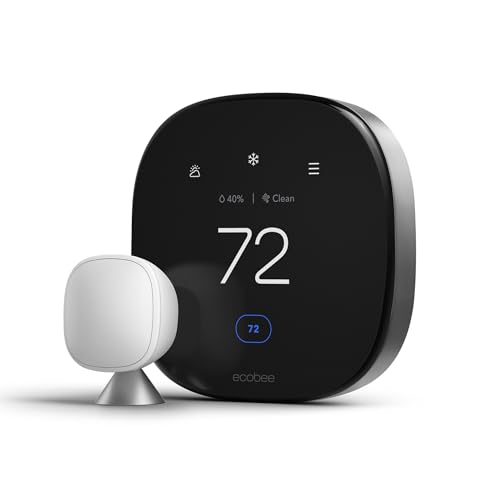
If you have a learning thermostat like Ecobee Smart Thermostat Premium or a Nest Learning Thermostat, it will adjust automatically over a few weeks. But you can speed up the transition by manually switching from cool to heat mode and setting your fall schedule now. Add remote room sensors to bedrooms so the thermostat prioritizes comfort where you sleep instead of the hallway.
3. Update Lighting Automations for Shorter Days
Sunset comes earlier in fall. By October, sunset can be 90 minutes earlier than in July. If your smart lights turn on at sunset, they will start coming on at 6 PM instead of 8 PM. That is fine, but check your routines:

- Porch lights: Confirm they are set to sunset trigger, not a fixed time. Fixed times will be wrong by late September.
- Interior lights: If you have a “welcome home” routine triggered by arrival, add a “dusk” routine that turns on hallway and living room lights automatically so you do not walk into a dark house.
- Bedroom lights: Adjust your evening wind-down routine to start 30 minutes earlier. The earlier sunset shifts your circadian rhythm whether you want it to or not.
- Wake-up lights: If you use smart bulbs to simulate sunrise in the morning, move your wake time 15 minutes earlier to match the season. A Philips Hue White Ambiance bulb works well for this.
4. Check Smoke and Carbon Monoxide Detectors
Fall is when heating systems kick back on, and that is when carbon monoxide risks spike. Test every smart smoke detector and CO detector in your home. Replace batteries in any that are not hardwired. If you do not have CO detectors in bedrooms and near the furnace, add them now.
Smart detectors like the First Alert Smart Smoke & CO Detector send phone alerts when they detect CO or smoke, and they self-test automatically. But you should still press the test button monthly during fall and winter when heating is active.
5. Adjust Smart Blinds for Heat Retention
In summer, your smart blinds close during the day to block heat. In fall, reverse that strategy. Open blinds during the day to let sunlight warm your home naturally. Close them at sunset to trap that warmth inside. This single change can reduce your heating bill by 10 to 15 percent on sunny days.

If you have motorized blinds with a smart home hub, create a fall automation: open blinds at sunrise, close them at sunset. The solar gain during the day is free heat.
6. Winterize Smart Outdoor Devices
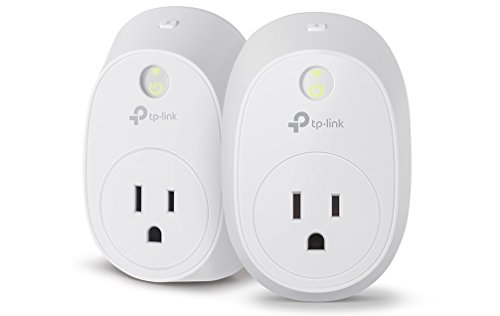
Check the temperature ratings on your outdoor smart cameras, smart plugs, and sensors. Many are rated to 14 degrees Fahrenheit but may malfunction below freezing. Bring indoors any smart plugs not rated for outdoor use, and replace them with weatherproof models like the Kasa Outdoor Smart Plug.
For outdoor cameras, check that weatherproofing seals are intact. Replace any cracked housing before rain and snow arrive. If you have battery-powered cameras, cold weather drains batteries faster. Switch to wired power or keep spare batteries charged.
7. Set Up a Fall Heating Automation
Create a simple automation that ties your thermostat, blinds, and fans together for maximum efficiency:
- Sunrise: Open blinds on south-facing windows. Turn off heat temporarily. Let solar gain warm the house.
- Midday: If indoor temp exceeds 72 degrees from solar gain, close blinds partially. Do not run AC, just reduce sunlight.
- Sunset: Close all blinds. Set thermostat to evening target (68 to 70 degrees). Reverse ceiling fans to clockwise at low speed.
- Bedtime: Lower thermostat to 65 degrees. Turn off living area lights. Keep bedroom at comfortable sleeping temp using room sensors.
8. Clean and Check Smart Air Purifiers
Fall brings pollen from ragweed and mold from wet leaves. If you have a smart air purifier, replace the HEPA filter now before allergy season peaks. Set the purifier to auto mode so it ramps up when air quality drops. If you have a Govee air quality monitor, create an automation that turns the purifier to maximum when PM2.5 exceeds 35 or when humidity drops below 30 percent (dry air means more dust).

9. Review Your Smart Home Security Before Holiday Season
Fall leads into the holiday season, which means package deliveries increase and so do porch pirates. Now is the time to:
- Test your video doorbell and make sure motion detection covers your entire porch
- Add a smart lock Yale Assure Lock 2 with a keypad so delivery drivers can leave packages inside your garage
- Set up doorbell notifications to your phone and smart watch
- Create a “delivery expected” routine that turns on porch lights when motion is detected during daytime
- Review your camera subscription storage. Make sure you have at least 30 days of cloud recording.
The Bottom Line
Seasonal smart home maintenance takes about 30 minutes and saves you money all season. The two highest-impact changes are adjusting your thermostat schedule and reversing your smart blinds strategy. Together, those two changes can cut your heating bill by 20 percent compared to leaving summer settings in place. Add the security review for porch deliveries, and you are set for fall.
The best smart home is not the one with the most gadgets. It is the one that adjusts to your life and your seasons automatically. Spend 30 minutes now, and your home will take care of the rest through October, November, and beyond.
Related Reading
Get Our Free Smart Home Setup Checklist
Join 2,000+ smart home owners getting weekly tips and gear picks. No spam, unsubscribe anytime.
My take: Fall prep is the mirror of spring’s: reverse the fans, flip the thermostat to heating mode with bedroom sensors, and move lighting to sunset triggers before October eats your schedule. An afternoon of updates keeps the automations working with the season instead of against it.
Related guides
- Apple Home Hub 2026: What Coming, When, and Whether You Should Wait
- Smart Home Backup Power: How to Keep Your Devices Running When the Grid Fails
- Smart Home for Seniors: What Helps (And What Creates More Problems Than It Solves)
- Smart Home Office Setup: Devices That Improve Productivity
- Schlage Sense Pro: The First Smart Lock with True Hands-Free UWB Unlock
🏠 Get Your Free Smart Home Setup Checklist
Join our newsletter and get this free printable plus weekly tips.
Frequently Asked Questions
What fall smart home adjustments should I make?
The big three: reverse ceiling fans (clockwise at low speed pushes warm air down without a draft — automate the switch for October 1st on a Bond Bridge or smart fan controller), flip the thermostat from cooling to heating (68–70°F day, 65°F night; learning models will drift there, but manually switching modes speeds it up), and update lighting for shorter days — October sunset runs 90 minutes earlier than July’s, so sunset-based triggers beat fixed times.
How do I stop heating an empty house in fall?
Switch from the summer away-cooling mindset to a heating schedule with real setbacks — the post’s targets are 68–70°F when home, 65°F at night, lower when away. Add remote room sensors to bedrooms so the system prioritizes where people actually sleep instead of the hallway, and let geofencing handle the coming-home warm-up automatically.
Why do my lighting automations break in fall?
Fixed times drift out of sync with daylight — sunset in October is about 90 minutes earlier than July, so your summer schedule fires lights in daylight or leaves you in the dark too early. Move everything to sunrise/sunset triggers, and audit fall-specific additions like porch lighting for earlier dark and vacation-mode timing while you’re in there.
Liked this guide? Get the next one in your inbox — the smart home starter checklist is free too.
✓ You're in — check your inbox.
No spam. Unsubscribe anytime. We never share your email.
Price Check
Prices verified via our product tracker. Updated Oct 14.
| ecobee Smart Thermostat Premium - WiFi, Siri & Alexa Built | $252.99 | 4.3★ (4,170) |
| Amazon Smart Thermostat, Works with Alexa and Ring, C-wire | $79.99 | 4.0★ (25,569) |
| Philips Hue White Ambiance A19 2-Pack 60W Equivalent Dimma | $26.99 | 4.6★ (793) |
| First Alert SC5 Hardwire Smart Smoke & Carbon Monoxide Ala | $128.98 | 2.2★ (733) |
| Eve Energy (Matter) - Smart Plug, App and Voice Control, 1 | $43.95 | 4.2★ (432) |
| Kasa Smart WiFi Plug w/ Energy Monitoring by TP-Link – No | $134.98 | 4.3★ (291) |
| Govee WiFi Thermometer Hygrometer H5179 with App Notificat | $39.99 | 4.3★ (7,862) |
| REOLINK 4K 8MP Dual-Lens PTZ Wired WiFi Outdoor Security C | $219.99 | 4.2★ (1,518) |
| Yale Assure Lock 2 – Satin Nickel Smart Lock for Front Doo | $189.99 | 3.8★ (175) |
As an Amazon Associate we earn from qualifying purchases.